Features
AI Influencer Generator
By Ofrai Editorial (Use Case Research)
An AI influencer generator builds a synthetic creator whose face, styling and visual world stay recognisable across an entire content calendar. You approve one master frame, reuse it as the reference for every later image, and change only one variable at a time — wardrobe, location, or camera. On Ofrai the whole sequence runs inside Image Studio against the same credit balance, with the library keeping each approved frame addressable by hand.
New accounts include 1 free GPT Image 2.5 generation. Other models and video use credits.
Example prompts
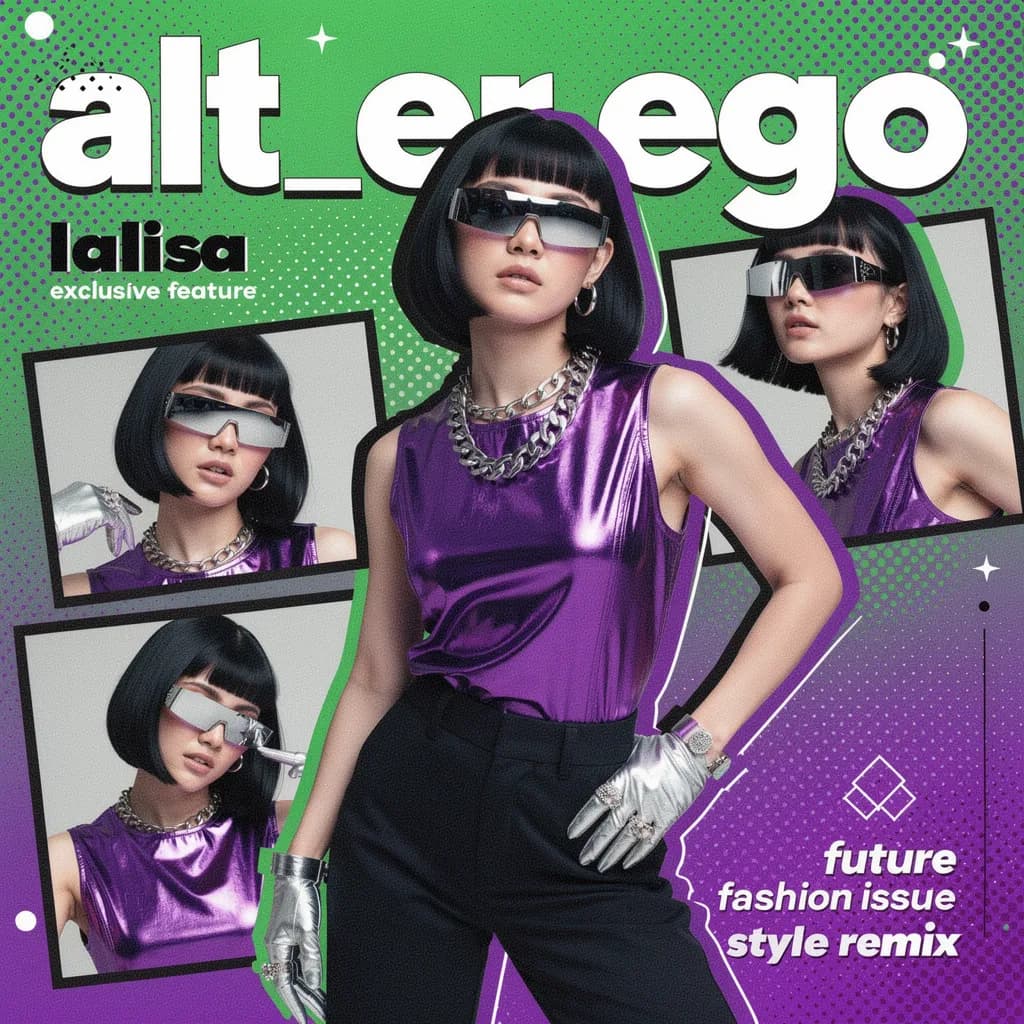
Fashion magazine collage cover, Y2K futurist look, silver wrap shades and metal gloves, neon blocks and halftone, bold title space
What makes an AI influencer read as one person
Consistency is the entire job. Viewers decide in under a second whether the same person is in frame, and they decide it from bone structure, hair and skin tone rather than from clothing. That is why describing a creator in words alone drifts: every generation samples a slightly different face. Fix a short list of invariants instead — face shape, hairline, brow spacing, one distinguishing detail such as a small mole — and repeat them verbatim in every prompt before producing a full set.
Building the AI influencer reference before the feed
Treat the first approved image as a character sheet, not as a post. Generate one clean neutral frame: neutral expression, even light, plain background, waist-up framing. Save it and use that same file as the reference input for everything after. From there, change one axis at a time — wardrobe, location, or camera — never two, because simultaneous changes are exactly what makes a series stop looking like one person.
Keep the reference file byte-identical across the campaign; a re-export or a light retouch changes the conditioning signal and the face drifts.
Wardrobe and location sets that stay on brand
Consistency does not mean identical styling. Define a small wardrobe set, a location set and one lighting rule, then let the model vary pose. Write wardrobe as fabric and fit rather than brand names — "oversized cream knit with wide-leg trousers" travels better than a label, because brand terms pull in unrelated references. For locations, hold the palette steady across a set: a warm beige one day and a cold blue the next breaks the illusion even when the face is perfect.
Reference discipline across a campaign
Discipline is what separates a usable creator from a one-off render. Keep a single master reference and never mix two looks in one prompt. When you need a second outfit or setting, generate it as a fresh pass from the same master instead of editing the previous frame. If a campaign needs a duo or a family, render each character in its own pass and combine them in a separate image job — averaging two faces into one frame is the most common reason a creator stops being recognisable.
Ratios and crops planned per platform
Plan per platform rather than per prompt: 9:16 for Reels, TikTok and Shorts, 4:5 for a caption-heavy feed, 1:1 for carousel cards and marketplace listings. Generate at the delivery ratio so the crop does not sever an arm or a hairline. When one hero frame has to cover several ratios, keep the subject centred with generous space on both sides, then re-render the vertical version rather than cropping the landscape original — a framing engine gives a better vertical composition than a crop does.
Consistency failures in an AI influencer run, and how to recover
Three failures recur. Face drift usually comes from mixing references or rewording the physical description mid-campaign; fix it by copying the last approved prompt and editing only the one variable line. Wardrobe leakage happens when the new garment type matches something already in the reference, so name the new garment explicitly and say what it replaces. Scale drift comes from wide lenses in tight rooms, which makes the creator read as a miniature set — state the real environment and room size instead.
Model choice for creator work
nano-banana-pro is the practical default: it holds a reference face across many generations and follows long, specific instructions without dropping earlier constraints. gpt-image-2 is worth the extra cost for hero frames that will be printed or placed at campaign size. flux-2 gives fast, cheap drafts for testing wardrobe and location ideas. seedream-5 suits a softer illustrated creator style or frames that need readable text. Draft on flux-2, publish from nano-banana-pro.
A reusable prompt template for creator sets
Keep this skeleton in a note and paste it into every generation, changing only the bracketed lines: "[name], [age range], [face shape] face, [hair length and texture], [one distinguishing detail]. Wearing [garment described by fabric and fit]. In [location], [light description]. [shot size], [lens], [aspect ratio]." The invariant block must never be reworded, because rephrasing a description is how you accidentally ask for a different face. Vary only the garment line and the location line within a set.
A worked example: "Ines, early thirties, oval face, dark shoulder-length wavy hair, small mole on the left cheek. Wearing an oversized cream knit with wide-leg trousers. In a sunlit concrete stairwell, hard midday light from above. Waist-up, 85mm, 4:5." Swap the knit for a rust overshirt and the stairwell for a laundrette and frame two of the set exists, with no other edit.
The settings that lock a synthetic face
Use the approved source image again in a mode that accepts references, and state what should stay unchanged. Resolution matters less than people assume for feed work and a great deal for anything viewed large, since a creator face rendered small hides flaws a profile grid at 4:5 will not. Set aspect ratio per delivery rather than per prompt.
And never re-upload a retouched version of the master as a new reference: the retouch becomes part of the identity, and the clean original then reads as a different person.
Spotting age, skin and hairline drift in a run
Four drift signatures recur and each has its own cause. Age drift, where the creator looks five years older or younger between frames, almost always means the lighting changed, because hard side light adds years and flat frontal light removes them — hold the light line constant rather than rewriting the age line. Hairline drift is usually a framing change, since a tighter crop changes how much forehead the model invents. Proportion drift, where the figure reads as a miniature or a giant, comes from wide lenses in tight rooms.
The habit that works is to compare a new frame against the master at full size, side by side, and check the face first, the silhouette second, and nothing else.
What a twelve-post month costs to generate
Plan the month as one batch rather than twelve separate decisions. A typical month of twelve posts — two hero frames, six lifestyle or product frames, four vertical cuts — lands somewhere between twelve and twenty generations, because roughly a third of attempts are discarded to one of the drift signatures above. Draft every composition on flux-2 at the lowest useful resolution, because the failure you are hunting at that stage is compositional and resolution does not change whether a pose reads.
Produce the approved compositions on nano-banana-pro and spend gpt-image-2 only on the two hero frames if they will be placed large. The cost mistake to avoid is re-generating a rejected direction ten times instead of rewriting the prompt: when a frame is wrong the brief is usually wrong too, and no amount of resampling fixes a mis-specified request.
Why this is not the same as an AI fashion model tool
The two overlap on the surface and diverge on intent. An AI fashion model tool exists to show one specific garment on a plausible body, usually one look at a time, and its job is drape, fit and product legibility. An AI influencer generator exists to build a recurring identity — a person a viewer recognises across a calendar, a feed, a set of ads — so its real output is consistency over time rather than a single good garment shot.
That means budget and effort go to different places: fashion work goes into the garment reference and one accurate pass, influencer work goes into the master frame and the discipline of never touching it again. If your requirement is one accurate product image, use the fashion tool and keep it simple. If your requirement is that twelve posts are recognisably the same person, that is what this page is for.
FAQ
- Can I use an AI influencer for paid brand deals?
- Usage rights depend on the model terms and your Ofrai plan, and disclosure rules usually apply wherever synthetic people appear in commercial content. Read the terms on the specific model page before signing anything, and label the AI nature of the personality clearly in the profile. Many brands accept synthetic creators for product-focused work but restrict claims that depend on a real personal experience.
- How do I stop the face changing between posts?
- Lock one master reference image and use it unchanged for every generation in the campaign. Repeat the same physical description — face shape, hairline, brows, one distinguishing detail — in each prompt, and change only one axis at a time. Mixing two references into one prompt is the most common cause of drift, as is rewording the description mid-series.
- Do I need a real person or a photo shoot to start?
- No. Most creators on Ofrai are built from a generated first frame. Generate one neutral reference portrait, save it, and treat it as the identity anchor for everything after. If you want a specific look, a single sharp reference photo of any person gives the model far more to work with than a paragraph describing a face in text.
- Can Ofrai animate my AI influencer?
- Yes. Send an approved still to Video Studio and use an image-to-video engine for short clips, lip-synced lines, or product demonstrations. Start from a locked medium shot with clear chest-up framing, since a tight crop leaves the motion model less room to invent. The same credits cover stills and video, so a creator can be produced end to end in one place.
- How many images should a launch set include?
- Six to ten frames covers most campaigns: two hero images, three or four lifestyle or product frames, and one or two vertical versions for short-form. Produce them from a single approved master reference so the set stays internally consistent, and re-render only the frames that will run at large size. Ten variations of a rejected look is simply wasted credit.
Related generators
- AI Friendship Photo Generator for Two Friends
- AI Funny Photo Generator
- AI Group Photo Generator
- AI Avatar Generator — Consistent Faces
- AI Caricature Generator
- AI Fashion Model Generator
- AI Flight Attendant Generator
- AI Girl Generator
- AI Office Lady Generator
- AI Portrait Generator
- AI Soft Girl Portrait Generator
- AI Action Figure Generator