Features
AI Flight Attendant Generator
By Ofrai Editorial (Use Case Research)
Create a fictional cabin crew portrait in a jetway, aircraft cabin, or on an airport ramp. Open an editable prompt in Ofrai Image Studio, adjust the uniform and lighting, and check the credits before generating. Eligible new accounts can use their welcome voucher for one qualifying GPT Image 2.5 image.
New accounts include 1 free GPT Image 2.5 generation. Other models and video use credits.
Example prompts
Cabin crew portrait in a jetway
Portrait of a fictional adult cabin crew member in a tailored teal jacket, white blouse, and narrow scarf. Stand by the jetway windows with a relaxed posture. Soft window light, mid-thigh crop, eye-level camera. Keep the uniform generic and unbranded.
Use this templateCabin service scene
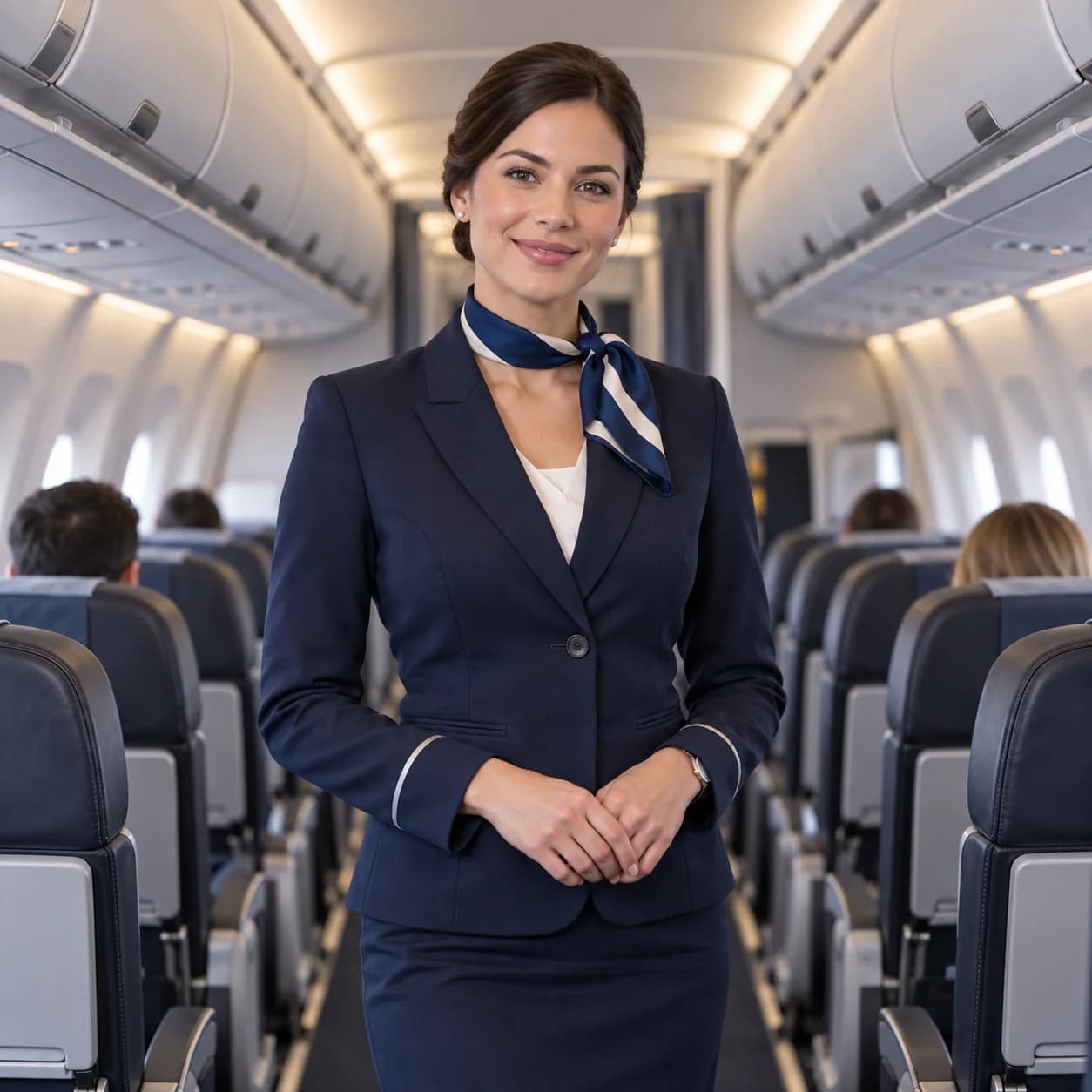
Fictional adult cabin crew member in a tailored teal jacket, white blouse, and narrow scarf, standing in a modern aircraft aisle. Warm light under the overhead bins, three-quarter view, hands resting at the sides. Keep the uniform generic and unbranded.
Use this templateAirport ramp portrait
Fictional adult cabin crew member in a tailored teal jacket, white blouse, and narrow scarf, standing on an airport ramp. Open sky, soft fill on the face, distant ground equipment, waist-up crop. Keep the uniform and surroundings unbranded.
Use this templateUniform detail that makes an AI flight attendant read as real crew
Cabin crew uniforms read through small details, so write them: 'tailored navy jacket with a narrow notched lapel, fitted midi skirt to mid-calf, plain white blouse, slim burgundy neck scarf tied at the collar, low black shoes, no visible pin or logo'. Mention the closure — single-breasted with two buttons — because ambiguous jackets produce double-breasted ones. Pin badges and name tags are trademark territory, so leave them out and add your own brand mark in post if the concept needs it.
A waistcoat or a different scarf colour is usually enough to make a second crew member.
Jetway, cabin, and ramp environments
Three environments carry three different stories. The jetway is the hiring and travel shot: fluorescent ceiling strips, a window wall, hard carpet, and a corridor of perspective. The cabin is the service shot: overhead bins, seatbacks, warm indirect lighting, and a narrow aisle that forces a three-quarter body framing. The ramp is the operations shot: open sky, tarmac texture, ground equipment, and a harsher sun that needs fill. Each one changes the crop, so decide which environment the image is for before writing the prompt.
Posture and camera language for a profile shot
Crew portraits work when they look composed rather than posed. Standard shapes: standing with feet close and weight even, hands relaxed at the sides or one hand lightly holding a clipboard, shoulders back, chin level, eyes to camera. A three-quarter body framing from mid-thigh up is the most usable for recruiting pages and portfolio cards. Keep the camera near chest height with a 50–85mm equivalent so the face is not distorted, and add 'natural confident expression, slight smile' rather than asking for a specific emotion.
Brand-neutral concepts that avoid trademark problems
Naming an airline in the prompt will pull that carrier's colours, tail logo, or uniform pattern into the image, which creates avoidable legal exposure. Stay with descriptive language: 'generic aviation navy', 'deep teal with a muted gold trim', 'contemporary low-cost carrier style'. Same principle for insignia: no epaulettes with visible rank bars, no wing pin, no name badge. If the output is for a concept board or a training deck, the neutral version communicates the idea just as well and travels further.
Crops and ratios for cards, posters, and bios
Crew imagery is often delivered in several shapes: 4:5 for profile cards, 1:1 for avatars, 2:3 for posters, and 16:9 for presentation headers. Those are delivery crops, not all Image Studio generation settings. Choose an available ratio such as 3:4 for a vertical portrait, leave space around the head and shoulders, and crop the saved image to its destination. A wide header may need its own 16:9 composition. Check every crop so eyes, scarf, and hands remain in frame.
AI flight attendant portrait templates with swappable variables
Build one template with replaceable fields: [crew member description] + [uniform block] + [environment and light] + [framing] + [expression]. Example: 'a cabin crew member in her early thirties, warm brown skin, hair in a neat low bun, wearing a tailored deep teal jacket with a narrow lapel and a plain white blouse, standing in a jetway with hard ceiling lights and a window wall behind, three-quarter body framing from mid-thigh up, 85mm lens at chest height, natural confident expression, no text, no logo, no badge'.
Who this page is not for
This workflow is for concept boards, editorial illustration, training materials, game and film design, and marketing for a fictional or internal concept. It is not for representing a real person. Do not use it to imply a named individual works for an airline, do not attach a generated face to a real recruitment process, and do not generate a likeness of an identifiable employee. If a campaign needs a real cabin crew member, book a real shoot — a synthetic face used in a hiring context is both misleading and risky.
Keep the same uniform across three settings
Start with one of the editable prompts above. Reuse the crew member and uniform description when moving to another setting. Change the environment and light, then compare the jacket, scarf, and face across the results before using them as a set.
Ratio, reference, and batch settings for a campaign
Choose a ratio offered by the selected model, such as 3:4 for a vertical portrait, and leave room for the final card or poster crop. If that model accepts image references, use an approved fictional crew portrait with the same casting and uniform text in later prompts. A reference can help continuity but does not lock a face; inspect every result before using it in a series.
Group prompts by environment so you can compare lighting, and select the resolution and number of outputs only after checking the credit cost shown in Image Studio. Make a separate 16:9 composition when a portrait crop cannot cover a header.
Credits for a campaign set
Image Studio shows the credit cost for the selected model, resolution, and output count before you generate. Eligible new accounts can redeem one welcome voucher for one qualifying GPT Image 2.5 still; other models and later runs use credits. The number of iterations needed for a campaign varies with the brief and the results, so budget from the displayed per-run cost rather than a fixed generation count. Reuse the uniform block, inspect buttons, scarf, and logos at full size, and change one prompt variable at a time.
If one approved image fits several destinations, crop that file instead of paying for unnecessary new renders.
Crew portraits versus fashion model and portrait pages
A cabin crew portrait is a professional uniform portrait, and the uniform carries the meaning: closure, collar, scarf, shoes, and the absence of anything branded. A fashion model page optimises for garment drape and editorial mood, which produces beautiful clothing and a less credible uniform. A general portrait page optimises for face and light in modern clothing, so it will not give you a tailored jacket with a correct closure. Use this page when the uniform is the subject and the environment is the storytelling.
If the deliverable is a beauty campaign with no uniform logic, the fashion or portrait page is faster. If the deliverable is training material for a fictional carrier, this page plus your own typesetting covers it, and that combination is usually what internal teams actually need.
What to change for a second crew member
Change exactly three things and keep the rest of the block identical. One: the casting description — age range, build, skin tone, hair, and one identifying detail. Two: at least one uniform variable, such as a different scarf colour, a waistcoat, or a different skirt length, so the crew reads as a team rather than a duplicate. Three: the pose or the crop, so the two images are not the same picture twice. Everything else stays: the lighting sentence, the camera height, the lens, the expression wording, and the framing.
That way a campaign with six people still reads as one brief. Check each new person against the campaign rule that matters most: no visible pin, no wing badge, no name tag, no epaulette rank bars. Consistency is what convinces a viewer that a concept carrier exists, and inconsistency is what makes it look like six unrelated stock photos.
Examples
FAQ
- Can I generate a flight attendant who works for a specific airline?
- Not as a brand representation. Naming an airline in the prompt usually pulls that carrier's colours, tail logo, or uniform pattern into the frame, which creates avoidable trademark exposure. Describe the uniform generically instead — 'tailored deep teal jacket, narrow lapel, plain white blouse' — and add your own brand mark in post if the concept needs one.
- How do I stop the uniform from changing between shots?
- Write the uniform once as a detailed block and paste it into every prompt: garment, colour, closure, length, and accessories. Mention the closure explicitly, such as 'single-breasted, two buttons', since ambiguous jackets flip to double-breasted. For a second crew member, change only hair and face, never the uniform description.
- Which Ofrai model works best for cabin crew portraits?
- Check the available models in Image Studio and compare a draft with the same crew brief. Choose a model that supports the reference input you need, then review its displayed credit cost and output. No model guarantees that the face, uniform buttons, or insignia will stay identical across separate generations.
- What aspect ratio should a crew profile photo use?
- Plan 4:5 for profile cards, 1:1 for avatars, 2:3 for posters, and 16:9 for presentation headers. In Image Studio, choose a supported generation ratio such as 3:4 for a vertical portrait, leave headroom, and crop the saved file to the final format. A wide header may need a separate 16:9 composition.
- Can I use generated cabin crew images in recruitment materials?
- Only as illustration, never as a stand-in for a real applicant or employee. Do not attach a generated face to a real recruitment process or imply that a named individual works for an airline. For a campaign featuring real cabin crew, book a real shoot; synthetic faces in a hiring context are misleading.
- Why do hands and jacket buttons come out wrong?
- Hands on a clipboard or a doorknob are a common source of extra digits, so write 'hands relaxed at her sides, natural five fingers' and skip props where possible. Buttons fail when the closure is unstated: say 'single-breasted with two buttons'. Check both at full resolution before signing the image off.
Related generators
- AI Avatar Generator — Consistent Faces
- AI Fashion Model Generator
- AI Friendship Photo Generator for Two Friends
- AI Funny Photo Generator
- AI Girl Generator
- AI Group Photo Generator
- AI Influencer Generator
- AI Office Lady Generator
- AI Portrait Generator
- AI Soft Girl Portrait Generator
- AI Action Figure Generator
- AI Caricature Generator