Features
AI Fashion Model Generator
By Ofrai Editorial (Use Case Research)
An AI fashion model generator lets you cast a virtual model and produce a full lookbook without a real shoot or a studio. That consistency is the whole job: the garment must read correctly, the cast must stay recognisable, and lighting must be uniform across the set. Plan the cast first, then generate garment by garment.
New accounts include 1 free GPT Image 2.5 generation. Other models and video use credits.
Example prompts
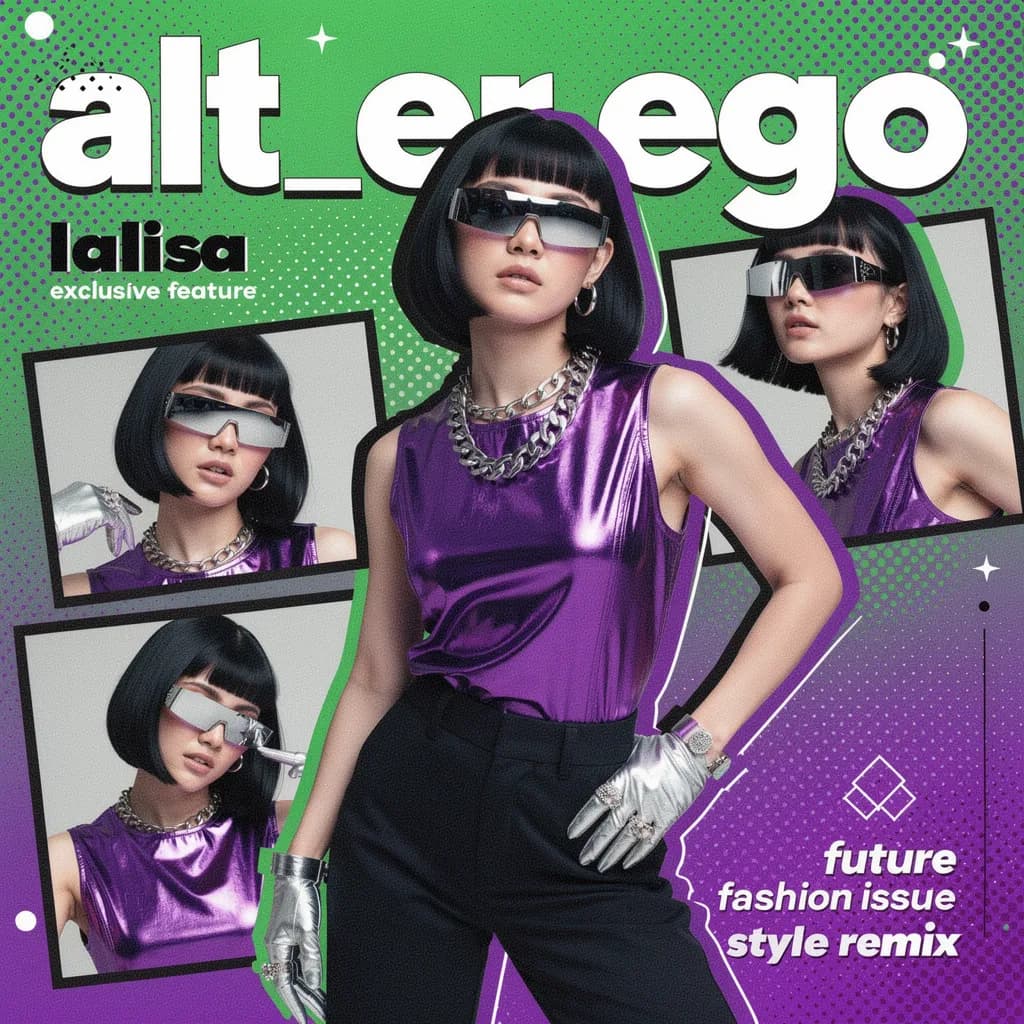
Fashion magazine collage cover, Y2K futurist look, silver wrap shades and metal gloves, neon blocks and halftone, bold title space
Casting an AI fashion model from written direction
A casting brief works like a real one. Specify age range, height and build, skin tone, hair colour and length, and one or two identifying details — a mole, a scar, a gap between the front teeth, a distinctive brow. 'Early thirties, tall and broad-shouldered, deep brown skin, close-cropped hair, strong jaw, small scar above the left eyebrow' gives the model something to hold. Repeat that brief verbatim in every prompt of the collection.
Vague casting language gives you a different model in every frame, which reads as a mistake no matter how good the clothes are.
Garment fidelity: drape, seams, and surface
Clothing fails quietly. Describe the fabric and how it should behave: 'mid-weight wool crepe with a soft matte fall, structured shoulder, invisible side seam', or 'silk with a liquid drape, catching a single specular highlight along the fold lines'. Count the openings you care about — buttons, pockets, vents — because an extra or missing button is the first thing a buyer notices. Avoid describing a garment in two different ways in one prompt; conflicting fabric instructions produce melted hems and impossible pleats.
Studio lighting recipes for lookbooks
Lookbook sets are defined by the light, not the clothes. Three setups cover most needs: 'large soft key at forty-five degrees camera left, white bounce fill camera right, black flag for edge definition' for clean commerce; 'single hard source behind a scrim, high contrast, deep shadows' for editorial; 'even top light with a white sweep, no falloff' for flat technical shots that need to be colour-accurate. Write the same lighting sentence into every prompt of a set. Vary it once and the collection stops looking like a collection.
Holding one AI fashion model across a full lookbook
Consistency comes from repetition plus control. Save the first approved render of the model, upload it as a reference for every subsequent shot, and paste the identical casting brief. Then vary exactly one thing per generation: garment, pose, or camera. If a frame drifts, you immediately know which variable caused it. Recasting a whole model mid-collection is the fastest way to make a lookbook feel assembled rather than shot.
Posing that keeps the garment readable
A dramatic pose can hide the thing you are selling. Use one of three safe positions: weight on one leg with the other relaxed, both hands in or near the pockets, or a mid-stride stance that opens the hem. Keep elbows slightly away from the torso so the jacket front stays visible, and keep hands off the fabric you want to see. Ask for hands loosely closed or in pockets rather than on the garment — fingers resting on a lapel reliably produce extra digits.
Editorial versus ecommerce model usage
Decide the purpose before you prompt, because the two want opposite things. Ecommerce shots want neutral pose, even light, and the garment filling the frame with nothing competing. Editorial shots want mood, environment, and a stronger crop — which is also the wrong choice if a size chart has to be believable. Never generate a model to represent a real person's likeness or to imply endorsement by someone who did not agree to it.
Synthetic models are fine for concept boards; keep them out of anything that reads as a real testimonial.
Fixing warped hands, jewelry, and logos
Three defects recur. Hands: generate them clasped, in pockets, or holding a single simple object, and state 'natural five fingers, relaxed grip'. Jewelry: describe one piece at a time and say 'no additional necklaces or bracelets', because extra chains appear without being asked. Logos and text: stylised engines produce letter-like fragments, so if a printed wordmark must be legible, render the garment plain and composite the real logo in post. Also check trims and zips at full resolution before signing off a lookbook.
Copy-paste lookbook prompts with garment blocks
Commerce look: 'a fashion model in her early thirties, tall and broad-shouldered, deep brown skin, close-cropped hair, strong jaw, small scar above the left eyebrow, wearing a mid-weight wool crepe blazer with a structured shoulder and an invisible side seam, weight on the left leg with the right relaxed, both hands loosely at her sides, large soft key at forty-five degrees camera left, white bounce fill camera right, black flag for edge definition, full-length framing on a white sweep'.
Editorial look: same casting brief, garment changed to 'a silk dress with a liquid drape catching a single specular highlight along the fold lines', lighting changed to 'a single hard source behind a scrim, high contrast, deep shadows'. Detail look: 'cropped waist-up frame, three-quarter view, hands loosely closed, showing the coat front and lapel'. The casting block is identical in all three. That is not a style choice, it is what makes the collection read as one model.
Aspect ratio and reference images for a collection
Shoot the collection in 3:4 or 2:3, since both carry a full-length figure and crop cleanly for banners and social. Vary exactly one variable per generation — garment, pose, or camera — so that when a frame drifts you know immediately which one caused it. Draft every look at low resolution on a cheap engine, because collection consistency is a composition problem that shows up in thumbnail, and rerun only the approved looks at delivery size.
Never switch engines mid-collection: a change of engine mid-way reads as two photographers, not one.
Credits for a twelve-look lookbook
A single look settles in six to ten generations once the cast is approved. A twelve-look collection is a real production and typically runs forty to seventy generations, because each garment re-tests the fabric behaviour, the pose and the face at the same time. The savings come from reusing the cast rather than from generating faster.
Rendering one approved model and using it as a reference for the remaining eleven looks is the single highest-value decision on this page, because it converts eleven casting problems into eleven garment problems, which are cheaper and easier to diagnose. Draft all twelve at low resolution, approve the set as a whole, then rerun the chosen looks at final quality.
If the client wants the model to change, treat it as a second collection rather than a revision, since changing the cast invalidates every consistency check you have already done.
Fashion model renders versus ecommerce listing images
These two pages optimise for opposite things and mixing them produces weak work. A lookbook needs a person: casting discipline, garment drape, editorial light, and a consistent identity across the collection. An ecommerce listing image needs the garment alone, evenly lit, colour-accurate, and compliant with platform rules, where a model's expression and pose are distractions. Use this page when the story is the collection — the mood, the cut, the fabric, the identity of the cast. Use the listing page when the story is conversion of a single product.
If you need both, generate the lookbook renders first, then use the approved garment detail from those renders as a reference for the white-background listing shots, which keeps the two sets visually consistent. What you must not do is paste a moody editorial model shot into a listing gallery; it fails the main image rules and it misrepresents the product's colour.
Colour, fabric, and trim checks before a lookbook ships
Run these checks at full resolution, because a lookbook is judged at poster size and in print. Compare every garment against its colour reference under neutral light, since a warm key light shifts a navy toward teal and a client will notice. Check fabric behaviour rather than fabric description: does the wool crepe fall in a straight line, does the silk catch one highlight along the fold, does the knit hold its rib?
Count the openings you promised — buttons, pockets, vents, zips — because one extra or missing button is the first thing a buyer spots. Look at the seams under the arm and at the hem, where renders usually fail quietly. If a printed wordmark must be legible, keep the garment plain in the render and composite the real logo, then export the colour master alongside the final so the collection can be reissued in another season without recasting the model.
When the brief is specifically about swimwear, use swimwear design and styling concepts to work on the garment and setting together.
FAQ
- Can I keep the same virtual model across a whole lookbook?
- Yes. Approve one render, upload it as a reference image for every later shot, and paste the identical casting brief each time. Vary only one variable per generation — garment, pose, or camera — so that any drift can be traced.
- How do I stop garments from melting or gaining extra buttons?
- Describe fabric and behaviour rather than category: 'mid-weight wool crepe, matte fall, structured shoulder, invisible side seam'. State the openings explicitly, such as 'three buttons, two side pockets', and never describe the same garment two contradictory ways in one prompt. Conflicting instructions produce folded hems and impossible pleats.
- Which Ofrai model is best for fashion lookbooks?
- Use nano-banana-pro for holding a reference model across a series, gpt-image-2 when any frame needs readable text or a logo, flux-2 for cheap draft layouts and pose tests, and seedream-5 for editorial scenes with a full environment. All four draw from one credit balance, so switching models mid-collection is free of account juggling.
- Do generated fashion images work for ecommerce listings?
- They work best as concept and lookbook imagery. For live listings, the model is a synthetic person, and buyers often expect real product photography; policies vary by platform and category. Many sellers pair a generated cast with real garment photography, or use generated images only for pre-shoot direction and mood boards.
- How do I keep lighting consistent across a collection?
- Write one lighting sentence and paste it into every prompt of the set, for example 'large soft key at forty-five degrees camera left, white bounce fill camera right, black flag for edge definition'. Keep the same camera height and focal length too. Vary lighting mid-set and the collection stops reading as one shoot.
- Can I sell generated fashion model images commercially?
- Usage rights follow the model you choose and its model terms, so check the model page and your plan before licensing or publishing. Never use a generated model to imitate a real person's likeness or imply endorsement they did not give. Keep the prompt and engine name with each final file for your records.
Related generators
- AI Avatar Generator — Consistent Faces
- AI Flight Attendant Generator
- AI Friendship Photo Generator for Two Friends
- AI Funny Photo Generator
- AI Girl Generator
- AI Group Photo Generator
- AI Influencer Generator
- AI Office Lady Generator
- AI Portrait Generator
- AI Soft Girl Portrait Generator
- AI Action Figure Generator
- AI Caricature Generator