Features
AI Soft Girl Portrait Generator
By Ofrai Editorial (Use Case Research)
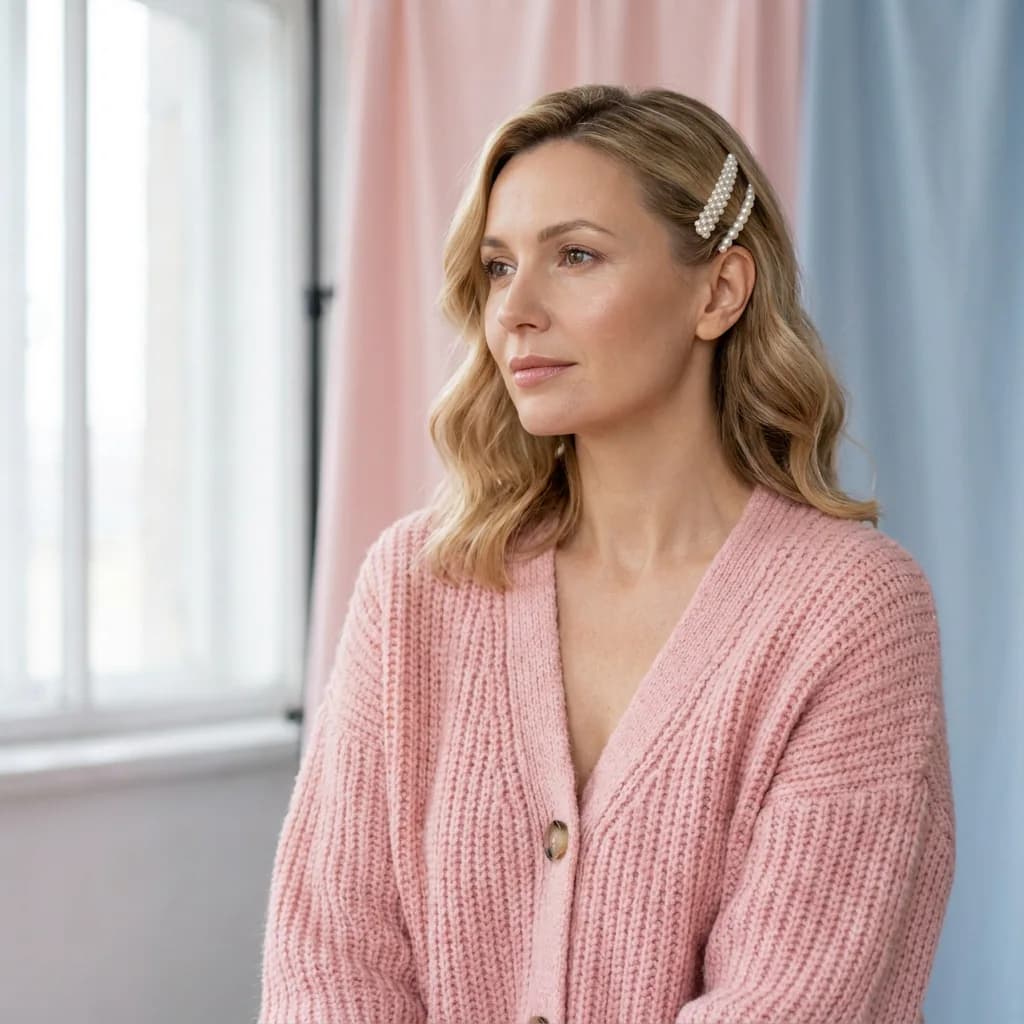
An AI soft girl portrait generator creates gentle, softly lit portraits of adult women — diffused window light, warm muted colour, low contrast and a shallow-focus background. In Ofrai you write the mood and the styling together, then upload one approved frame as a reference so a whole series stays on the same person. The style rewards restraint rather than spectacle.
New accounts include 1 free GPT Image 2.5 generation. Other models and video use credits.
Example prompts
Clearly adult woman aged 28–32 in a pastel cardigan with pearl hair clips, professional daylight studio, mature facial structure, refined soft-girl editorial portrait.
Soft versus blurry
Soft focus is about light and contrast, not about removing detail. A good soft portrait keeps eyes, lashes and hair strands sharp while the background falls away, with gentle shadow transitions on skin. If the whole frame is out of focus, the result is a mistake rather than a look. Specify what stays sharp — “eyes and hair in sharp focus, background gently blurred, skin with visible texture”. If the background is busy, increase the blur rather than the softness of the subject, since the two are not the same control.
Light that flatters
Soft light is large, close and directional: a sheer-curtained window at 45 degrees, bounced off a pale wall, or a large diffuser just outside frame. Add one weak reflector on the shadow side at close range for even skin tone. Avoid overhead light, which hollows the eyes, and avoid direct sun, which creates hard shadow shapes. Warm the white balance slightly — daylight-balanced flash reads clinical.
Shoot or render near a window if you can, since the size of the real source matters more than the word you use for it.
Skin, colour and grain
Decide the colour story before prompting: warm cream and honey, cool rose and grey, or muted olive and sand. One palette per frame. Then choose the finish: fine 35mm grain, a subtle halation around highlights, or a clean digital look with no grain. Ask for visible skin texture and pores — the fast way to avoid the plastic look is to request imperfection explicitly, because smoothing is the model’s default.
Styling that suits the mood
Simple clothing in soft, unstructured fabrics — linen, cotton, fine knit, loose wool — reads better than anything shiny or heavily branded. Natural or minimal makeup, hair with movement rather than a hard style, and relaxed posture complete the register. Avoid heavy costume, text-heavy garments and busy props; they fight the low-contrast treatment and pull the eye away from the face. Keep accessories to one or two pieces, because each additional object competes with the expression you are trying to hold.
Locking one person across a set
Generate a single approved portrait, then use it as the reference for every frame and describe only what changes — a different crop, a new outfit colour, a shift in time of day. Reference-led editing models preserve facial structure and body proportions, which text-only generation does not. Change one variable at a time across the set, or you lose the ability to tell which instruction caused a drift.
Choosing a model for gentle portraits
Use gpt-image-2 for long, specific briefs where lighting, wardrobe and framing all have to hold — it follows layered constraints best. Use nano-banana-pro to build a series from one reference portrait while changing pose or outfit. Use flux-2 to explore looks cheaply before committing. Use seedream-5 when the frame needs paired design elements such as a caption block or a border treatment. Keep the brief in a reusable template so later sessions start from the approved look rather than rewriting it from memory.
Over-smoothing and lost detail
The most common failure is skin that looks airbrushed, followed by hair that merges into the background and jewellery that disappears. Fix smoothing by naming skin texture and pores, and by adding a deliberate imperfection such as light freckles or a slight shine on the nose. Fix lost hair by separating subject from background in the brief — a pale wall behind dark hair, never a bright window edge cutting through it.
Three worked prompts for three kinds of softness
South-facing window light: “Portrait of an adult woman beside a large south-facing window in a white room, her face turned three-quarters away from the light, soft diffuse daylight from the left, no direct sun on skin, warm neutral colour, film-like grain, 50mm, chest-up, relaxed half smile, natural brows.”
Overcast shade: “Outdoor portrait under heavy overcast, standing in open shade with a pale wall behind, very flat soft light, no shadows on the face, muted green and grey palette, 85mm, head and shoulders, calm neutral expression, unretouched skin.” Backlit haze: “Portrait with the subject backlit by low sun through a gauzy curtain, warm haze, gentle flare, subject in soft shadow with lifted exposure, pastel palette, 105mm, waist-up, eyes toward the window rather than the camera.” Softness is a lighting property first.
If the light is hard and the prompt only says soft, you get a soft-looking filter over a hard photograph.
Lens, aperture and aspect ratio for this look
The lens is what separates a flattering soft portrait from a soft-filter portrait. 85mm and above keep facial proportions honest from a working distance, which is why they read as flattering rather than distorted; anything much wider than 50mm on a face enlarges the nose and lets the cheeks fall away.
Ask for a specific aperture rather than “shallow depth of field”, because the model responds to the actual number: f/1.8 holds the eyes and the tip of the nose, f/4 keeps the whole face sharp while the background softens. Aspect ratio follows the surface — 4:5 for a feed, 2:3 for a poster, 1:1 for a grid — and 1:1 suits this look particularly well, because soft light tolerates a square crop far better than hard light does.
Depth of field is also the least stable thing these engines render, so secure the position and size of the face in frame before chasing an aperture.
Keeping a face recognizable in soft light
Pushing further locks the expression and makes every frame read as a crop of the same photograph. The useful middle is a clean division: the reference controls identity, the prompt controls pose, lens and light. State that division in the prompt text, because otherwise the model blends the two and you end up with one face under three lighting setups that all look borrowed. Turn the reference off entirely when you want a new face carrying a borrowed mood, which is often a more useful result than chasing likeness.
What a soft portrait series costs in credits
Soft portraits cost less than they appear to, because they tolerate far more variation than a hard-lit studio frame does. A four-frame series is typically twelve to eighteen generations: two or three low-resolution probes per concept on flux-2 to settle light direction and crop, then one final each on gpt-image-2 or nano-banana-pro, plus a small reserve.
The temptation to spend more comes from chasing skin texture, which is exactly where budgets disappear: if a frame looks over-smoothed, the fix is usually one added clause rather than four more candidates. Every run shows its Ofrai credit cost before it executes.
Why soft prompts drift toward sickly or blurry
Four predictable drifts. The image goes milky because “soft light” was read as low contrast, so add “clean blacks, normal contrast, no haze”. Skin turns waxy and yellow because “warm” was applied to the entire frame, so specify “neutral skin tone, warm only in the background”. The frame blurs because “dreamy” and “ethereal” requested optical softness, so replace them with concrete optical terms such as “gentle diffusion, eyes in sharp focus”.
And the face ages or simplifies because the prompt literally said “girl”, so use an adult anchor like “adult woman in her late twenties” and repeat it on every frame in the set.
How this differs from glamour and editorial work
Soft portrait work optimises for tenderness and approachability, which is why it leans on diffuse light, low contrast and relaxed posture rather than on pose or attitude. Glamour work deliberately uses harder light, more contrast and a more assertive stance, because the intent is different. Editorial work is a commission where the subject, the styling and the rights are fixed by a client or an editor, so consistency of identity matters far more than mood.
If your deliverable has to look like a specific person who will recognise themselves in it, this page is the wrong one — use a reference-led portrait workflow with harder light. And a simple sanity check: shrink the finished image to phone size. A soft portrait should still read as an expression, while a hard-light glamour frame often reduces to a high-contrast silhouette.
Examples
FAQ
- What is a soft portrait style?
- A soft portrait uses large, diffused light, low contrast, muted warm colour and shallow depth of field to create a gentle, low-stakes mood. It is a lighting treatment rather than a filter: the eyes and hair should stay sharp while the background falls away, and skin keeps visible texture.
- How do I stop portraits from looking plastic?
- Request texture rather than relying on defaults, because smoothing is what the model reaches for first. Say visible pores and skin texture, add a deliberate imperfection such as light freckles, a slight shine, or a stray hair, and use soft directional light rather than flat frontal fill, which removes natural shadow.
- Can I generate the same woman in different outfits?
- Yes, by uploading an approved portrait as the reference and describing only the wardrobe, crop and time of day you want changed. Reference-led models such as nano-banana-pro keep facial structure and proportions stable, while text-only generation tends to produce a similar-looking but different person.
- Which Ofrai model suits soft portrait work best?
- gpt-image-2 for detailed briefs with layered constraints on light, wardrobe and framing. nano-banana-pro for building a consistent series from one reference image. flux-2 for cheap look exploration before you commit, and seedream-5 when the portrait needs to share a frame with design elements like type.
- Why does hair disappear into the background?
- Because hair and background land at similar brightness, so the outline has nothing to separate against. Fix it in the brief: specify a pale wall behind dark hair, add separation light on the hair edge, and avoid a bright window boundary running through the head. Regenerate rather than trying to repair the pixels later.
- Can I use soft portraits of generated women commercially?
- Commercial rights follow the model and model terms of the engine you select, so check the model page before publishing. Keep records of the prompt, model and date for approved images, and never present a generated person as a real individual or as a photograph of one.
Related generators
- AI Avatar Generator — Consistent Faces
- AI Fashion Model Generator
- AI Flight Attendant Generator
- AI Friendship Photo Generator for Two Friends
- AI Funny Photo Generator
- AI Girl Generator
- AI Group Photo Generator
- AI Influencer Generator
- AI Office Lady Generator
- AI Portrait Generator
- AI Action Figure Generator
- AI Caricature Generator