Features
AI Avatar Generator — Consistent Faces
By Ofrai Editorial (Use Case Research)
An AI avatar generator earns trust when the same person appears across a dozen images without drifting. On Ofrai that means running identity through nano-banana-pro, which holds facial structure across repeated generations, then using gpt-image-2 for frames that need readable text and flux-2 for cheap exploration of crop and background. The core technique is an identity block — a fixed sentence describing the person that you paste unchanged into every prompt — plus a reference image you keep and reuse. Everything else is layout.
New accounts include 1 free GPT Image 2.5 generation. Other models and video use credits.
Example prompts
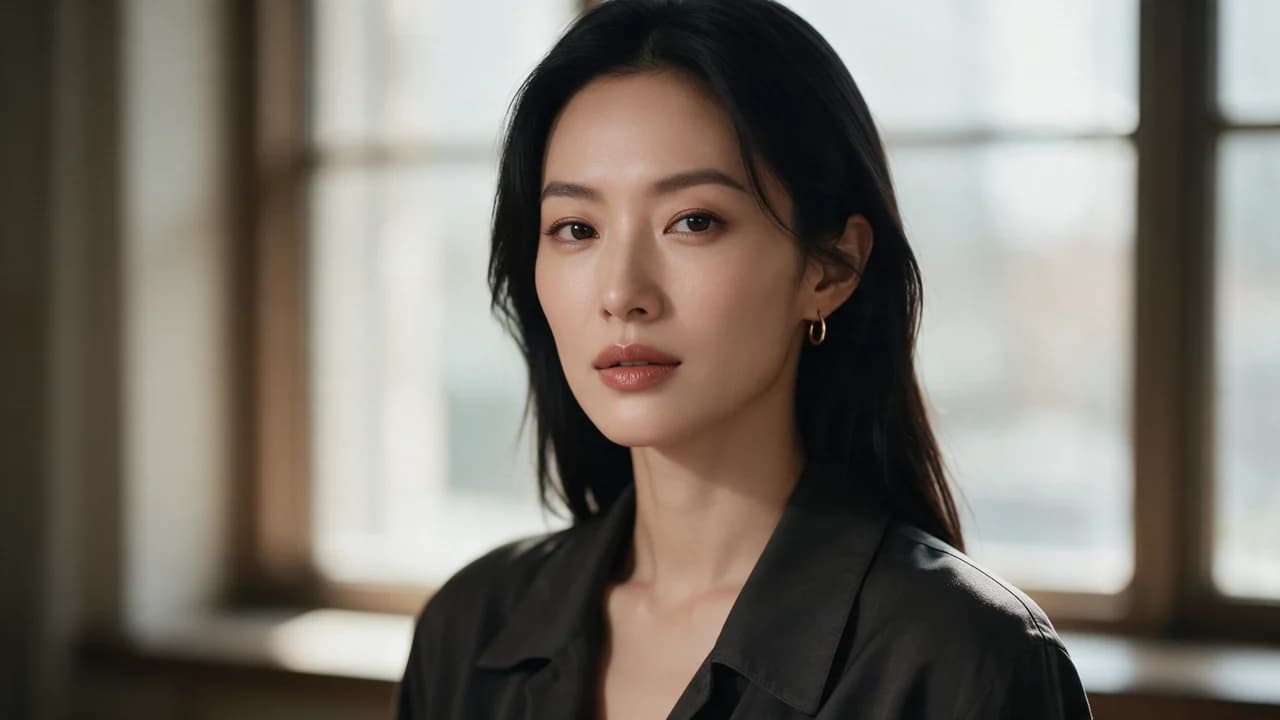
Window-side three-quarter portrait, dark shirt and thin gold hoop, soft window light, magazine shallow DOF
Why avatar work drifts and what actually fixes it
Most avatar inconsistency comes from describing the person freshly in every prompt. Each generation reinterprets age, jawline, and hair, and the differences accumulate across a set. The fix is structural: write one identity sentence and never rewrite it. Specify the things that define a face rather than its mood — apparent age range, face shape, hair colour and length, skin tone, distinguishing features, eyewear. Keep it under about thirty words, because long identity blocks dilute. Then paste it verbatim into every prompt and vary only the crop, wardrobe, and background.
When a face still shifts between two frames, the cause is usually that one of the two prompts used a different wording, so diff them before rerolling.
The identity block, written once
A workable identity block reads like a casting brief: 'a woman in her early thirties, oval face, dark brown shoulder-length straight hair, warm light-brown skin, small gold hoop earrings, defined brows, no glasses'. Notice what it excludes: expression, lighting, mood, and camera. Those belong to the shot, not the person.
Keep a copy of this block in a text file or note and reuse it verbatim across every avatar in the set — including the Chinese-language version of the project, where translating the block into natural Chinese rather than word-for-word keeps the description equally precise. When you add a feature later, add it to the block and regenerate, rather than describing it once in a single prompt.
Reference images as the consistency anchor
Where the engine supports it, a reference image beats any text description. Establish one approved portrait first, then reuse it for every subsequent generation, changing only what the shot needs. The practical pattern is: one master headshot, straight-on, neutral background, even light — because that frame contains the least styling to contradict. Generate the master on nano-banana-pro at square crop, save it, and treat it as the anchor.
Secondary frames should describe the delta explicitly, as in 'same person as the reference, now three-quarter view, warm window light, navy knit sweater'. Two inputs — a locked reference plus a fixed identity block — is the reliable combination; one alone is not enough.
Choosing crops for avatar use cases
Match the crop to where the image will actually live, because a crop chosen for a hero shot rarely survives being cropped again. Use 1:1 for social profile pictures, messaging app avatars, and professional-network headshots. Use 4:5 for feed posts and course-platform portraits, which display taller than wide. Use 3:4 or 2:3 for print-style bios, speaker cards, and event programmes. Use 16:9 only when the avatar sits inside a banner or presentation layout rather than standing alone.
Generate at the delivery crop from the first attempt. Framing words matter as much as ratio — 'head and shoulders, eyes on the upper third line, looking at the camera' produces a far more reusable frame than a vague 'portrait'.
Lighting, wardrobe, and background discipline
Light is what makes an avatar set look like one shoot. Pick two or three lighting setups and reuse them: 'soft north window light from the left, gentle falloff', 'even overcast daylight, no hard shadow', 'warm key from the front-right with a dark neutral background'. State the direction, because 'professional lighting' produces a different result every time. Wardrobe follows the same rule — write the garment once per set, including colour, material, and neckline, and describe only the change when you vary it.
For backgrounds, keep them plain and mid-tone: seamless paper, a soft grey wall, or a blurred environment. Busy backgrounds compete with the face and, on small circular crops, become visual noise at the edges.
Which model handles which avatar task
Route by requirement. nano-banana-pro is the identity engine here: use it for the master portrait and for every frame where the face must match another frame in the set. gpt-image-2 handles avatars that carry text or a brand device — a lanyard, a book cover, a screen behind the subject — and its instruction following suits briefs with hard constraints. flux-2 explores cheaply, so use it to test crop and background before committing a face to a layout. seedream-5 is the pick when the deliverable is stylised — illustrated profile art, illustrated course thumbnails, mascot-adjacent characters.
Drafting on flux-2 and finalising on nano-banana-pro keeps the per-set cost down while protecting the face.
Where an AI avatar generator breaks
Six common failures. The face changes between frames — diff your identity blocks and find the drifted word. Siblings look unrelated — describe the relationship, not just each person, and generate them in the same frame when the layout allows. Glasses or jewellery appear and disappear — name them explicitly, including the statement that they are absent when they are. The image reads as AI — soften by adding imperfection cues: slight asymmetry, natural skin texture, no perfect symmetry. Backgrounds cut into the head — leave margin above the hair.
And the age drifts younger on every rerun — pin the age range in numbers ('early thirties'), not adjectives.
An identity block written out in full
A workable avatar identity block reads like a casting brief rather than a description. Write it once and paste it verbatim: “Woman, early thirties, East Asian, oval face with a softly defined jaw, warm light-medium skin, dark brown straight hair to mid-shoulder with a centre part, natural brows, brown almond-shaped eyes, small nose, medium lips, no visible makeup, small silver stud earrings. Varies allowed: expression, head angle, wardrobe, background. Never varies: age, face shape, bone structure, eye colour, hair length, hair colour, earrings.”
The second paragraph matters as much as the first. Almost all avatar drift comes from the model quietly resolving an unstated field differently on every run, so naming which fields may vary and which may not converts an invisible problem into a checkable one.
Settings for an avatar set
Aspect ratio should be chosen by where the avatar will actually live rather than by the hero image: 1:1 for profile grids and avatar chips, 4:5 for feed posts, 3:2 for a banner or website header. If you need several crops, generate at the tallest ratio and crop down rather than generating separately at each ratio, because every generation is an independent interpretation of the face.
Resolution follows the smallest placement — a 96-pixel circle cannot reward extra pixels, while a hero portrait printed at 40cm needs them.
How an avatar set gets built across three models
Build in three passes rather than shooting for finals immediately. Pass two, on nano-banana-pro, turns each approved candidate into the set: portrait, three-quarter, three-quarter body, and one with a changed background, each with the identity block pasted and the reference pointing at the master. Pass three, on gpt-image-2, handles any frame that needs a piece of text — a name badge, a book cover, a profile header — the one thing cheap engines consistently get wrong.
Restyling the set afterwards is a fourth pass and belongs on the master frame rather than on individual images.
Credit budget for an avatar set
A complete set of six images runs to roughly twenty-five to thirty-five generations when it is built in the passes above, which is reasonable given that the same identity block and reference carry across every frame. Cost concentrates in pass one, because identity exploration is the only genuinely open-ended part: twelve candidates on nano-banana-pro instead of eight on flux-2 roughly doubles the set cost to find a difference you could have located cheaply.
Every generation shows its Ofrai credit cost before it runs, and all formats share one balance. If the budget has to be cut, cut the number of body crops before cutting resolution, and cut exploration only after those. A set generated from one approved identity instead of three is still usable; a set generated at draft resolution is not usable at all.
Who an AI avatar generator is for, and who should use a photo
Generated avatars fit work where the person is a concept or a placeholder: product pages that need a friendly face before a real person exists, course and app mockups, community spaces, game and story characters, and internal tools where a stock photograph would drag in licensing questions. They are a poor substitute for a real person’s photograph of themselves — users read a synthetic face as generic and slightly uncanny, and on a profile that people actually own, that costs trust.
Treat one further case carefully: generated faces that resemble real individuals, if that resemblance carries into hiring, education or credit decisions, are both an ethical and a regulatory problem rather than a style question. Read the terms of the specific model before any commercial use.
FAQ
- How do I keep the same face across many avatar images?
- Write one identity sentence describing age range, face shape, hair, skin tone, distinguishing features, and eyewear, then paste it unchanged into every prompt. Where the model supports references, also reuse one approved master headshot. Vary only the crop, wardrobe, and lighting, never the identity wording.
- Which Ofrai model is best for consistent avatars?
- nano-banana-pro is the identity engine on this page and should produce the master portrait and every frame where the face must match. Use flux-2 for cheap exploration of crops and backgrounds, gpt-image-2 when the avatar contains text or a brand object, and seedream-5 for stylised illustrated profile art.
- What aspect ratio should an AI avatar use?
- Use 1:1 for social profiles, messaging avatars, and professional-network headshots, 4:5 for feed posts and course platforms, 3:4 or 2:3 for speaker cards and print-style bios, and 16:9 only when the avatar sits inside a banner layout. Generate at the delivery ratio from the first attempt rather than cropping later.
- Can I generate an avatar of myself or my team from a photo?
- Generative avatar tools produce synthetic likenesses from description, and uploading a photo raises consent and likeness questions that Ofrai cannot resolve for you. Get written permission from anyone whose likeness you use, follow the model page's terms, and disclose synthetic images where a platform or audience expects real photography.
- Why does my avatar look obviously AI-generated?
- Usually because of perfect symmetry, plastic skin, and an empty background. Add imperfection cues — slight asymmetry, natural skin texture, a few visible hair strands — and use a real lighting direction rather than the words professional lighting. A slightly off-centre crop also reads as more photographic than a perfectly centred one.
- Can I use generated avatars commercially?
- Commercial rights follow the model you used and its model terms, so check the relevant model page and your Ofrai plan before publishing. The bigger practical issue is consent: never generate a recognisable likeness of a real person without permission, including for internal mock-ups that could reach a client.
Related generators
- AI Portrait Generator
- AI Action Figure Generator
- AI Character Sheet Generator
- AI Fashion Model Generator
- AI Flight Attendant Generator
- AI Friendship Photo Generator for Two Friends
- AI Funny Photo Generator
- AI Girl Generator
- AI Group Photo Generator
- AI Influencer Generator
- AI Office Lady Generator
- AI Soft Girl Portrait Generator