Features
AI Group Photo Generator
By Ofrai Editorial (Use Case Research)
An AI group photo generator has to solve the two problems that ruin every multi-person render: faces that disagree with each other, and lighting that treats each person separately. On Ofrai you open Image Studio, choose from gpt-image-2, nano-banana-pro, flux-2, and seedream-5, and describe the group as one lit subject rather than a list of people. The workflow is the same for three friends and for a twelve-person team portrait: set a single light direction, assign each person a distinct silhouette, and keep the prompt free of per-person detail that the engine will render inconsistently.
New accounts include 1 free GPT Image 2.5 generation. Other models and video use credits.
Example prompts
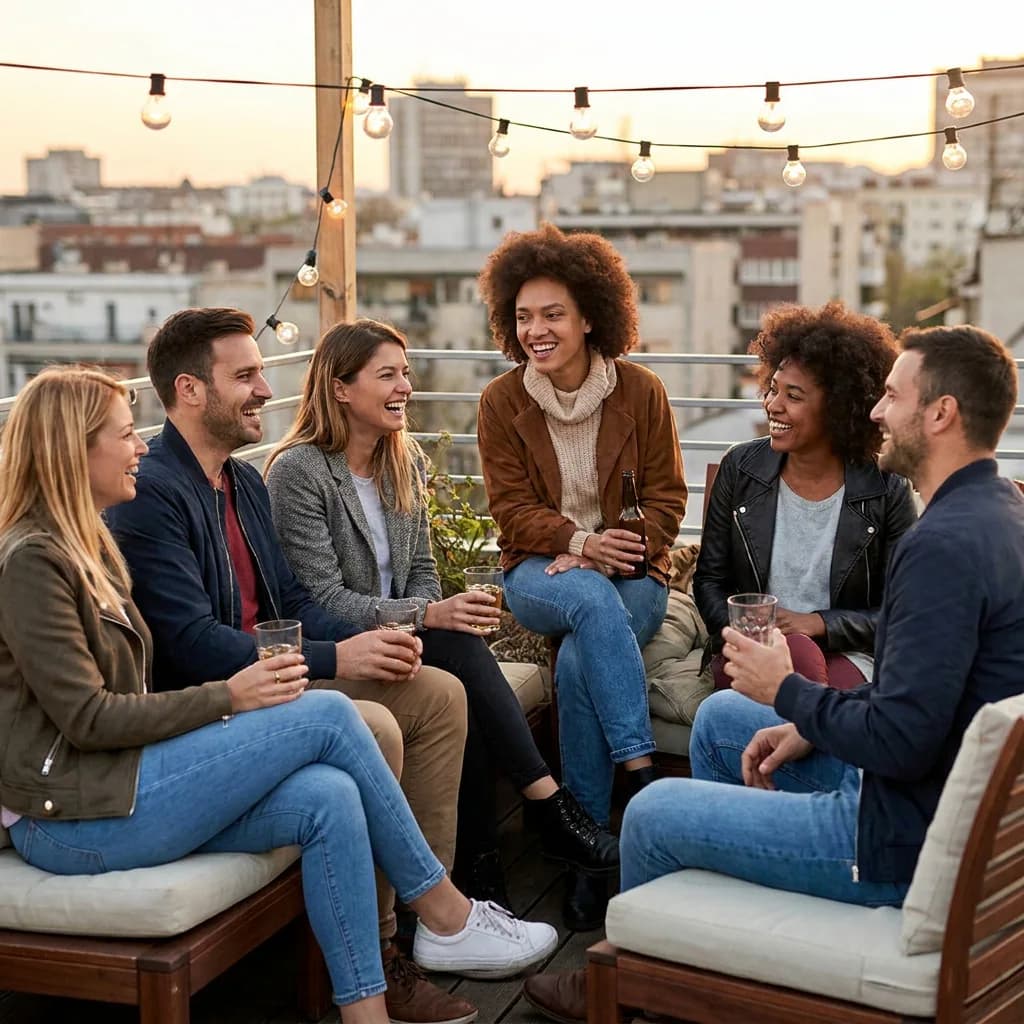
Six diverse adult friends together at a relaxed rooftop gathering, every face distinct and clearly visible, consistent warm evening light, natural group interaction.
Why multi-person renders break and what to change
The usual failure is not resolution, it is attention. Diffusion models distribute detail across the frame, so every extra face gets less of it. Three people is comfortable, five is workable, and beyond eight you should expect one or two faces to drift in age or structure. Lower the count, use a wider aspect ratio such as 3:2, and accept that the back row reads as atmosphere.
If you truly need a large crowd, generate a wide establishing frame and crop in — do not ask one render to deliver twelve sharp faces.
One light source, described once
Write the lighting as a single physical event: "late afternoon sun from behind camera left, soft fill from a white wall, everyone facing the same direction." Do not write per-person lighting, and do not stack competing sources like "rim light and neon and candlelight" — the model will assign each of them to a different person. Shared light is what makes a group read as one photograph. If the render looks pasted together, the fix is almost never more detail; it is deleting light clauses until only one remains.
Assigning each person a distinct silhouette
Faces get confused because the engine has nothing to separate them by. Give each person one clear shape: the tall one in a long coat, the one with a beanie and round glasses, the one holding a coffee cup at chest height. Vary height, stance, and prop rather than facial detail, since props and posture are easier for the model to keep stable across a whole group.
Ask for a loose triangular arrangement — two in front, three behind, one at the edge — because an evenly spaced row reads as a line-up rather than a photo.
Framing a team portrait that looks photographed
Real group photos have imperfect edges: someone half-turned, someone cropped at the shoulder, one person a step closer to the lens. Specify that imperfection. "Shot at eye level, 35mm, slight tilt, the person on the right caught mid-laugh and partly cropped" produces a far more believable frame than a symmetrical pose. Leave headroom above the tallest person and avoid cropping at the exact forehead line. For a studio alternative, ask for a seamless backdrop and even frontal light, which is easier for the engine than a complex environment.
Choosing the right model for people counts
gpt-image-2 is the strongest choice when faces must hold up, particularly for groups of three to five in close formation, because it allocates the most attention per face. nano-banana-pro is more reliable at obeying a long group description with varied wardrobe. flux-2 is fast and cheap for blocking a layout before you refine. seedream-5 handles larger environments and background crowds. A practical sequence: block the arrangement on flux-2, then render the final frame on gpt-image-2 for face quality.
Fixing the failures you will actually hit
Three fixes cover most bad results. Merged or doubled faces mean the group was too tightly packed — add a foot of space between people in the prompt or widen the ratio. Mismatched skin tones across one frame usually came from conflicting light clauses; delete them and describe one source. Limbs that terminate oddly, especially where someone is behind another, are best solved by restating who is in front of whom. Regenerating the identical prompt will not help, because the same ambiguity produces the same ambiguity.
What this page is good for, and what it is not
This workflow is strong for concept art, team banners, holiday cards, event recaps with fictional attendees, and storyboards where you need twelve consistent people cheaply. It is not a substitute for a real camera when an actual identifiable group matters — for genuine reunion or corporate photographs, real people carry real likeness expectations that generative output will not meet responsibly. Treat every group here as fictional and describe everyone as a character, not as a named person.
Three group prompts that hold together
Three friends outdoors: "three people standing on a footpath in late afternoon light, sun from behind camera left, the tall one in a long green coat, one in a beanie and round glasses, one holding a coffee cup at chest height, loose triangular arrangement, shot at eye level on 35mm, two in front and one a step behind, shallow depth of field."
Five-person team: "five colleagues in varied casual business wear against a plain concrete wall, soft even daylight from a large window to the right, relaxed shoulders, one person mid-laugh and partly cropped at the shoulder, headroom above the tallest, 3:2." Large team: "a wide photograph of about twelve people on a staircase landing, three loose rows, the back rows slightly soft, warm ceiling light, wide 21mm framing, plenty of background visible." Notice what all three omit: ages, hairstyles, and expressions per person.
Those are the details the engine renders inconsistently, and leaving them out is what holds the frame together.
Matching aspect ratio and depth staging to headcount
Match the ratio to the headcount instead of picking one and hoping. Three people sit comfortably in 4:5. Four to six want 3:2, which buys horizontal room without shrinking any face. Seven or eight need 16:9 or 3:2 with the back row standing one or two steps further from the lens, so the engine can let it soften on its own terms. Beyond eight, render 16:9 and treat it as an establishing frame you will crop from.
Stage depth explicitly as well — "two rows, the second row standing on a step behind" — which tells the model how to arrange people far more effectively than listing positions left to right.
Settings that stabilise a group render
Too little and faces drift toward a generic look; too much and the frame over-cooks, sharpening artefacts on hands. Start at the model default and adjust at most once per batch. Batch size: generate four at a time, because a batch that merges two faces usually carries the same fault throughout, and four wasted renders cost less than twelve. Reference image: attach an approved group frame to carry wardrobe and lighting forward — far more useful than a reference to any single face.
Ratio and lens stay fixed across the run for the same reason.
What a group photo run costs in renders and credits
Budget in passes again. Block the layout with four cheap flux-2 renders at 3:2 — you are buying positions, not faces. Take the best arrangement to gpt-image-2 and generate four frames, because that is where face quality is decided. Keep one winner and produce variants from it (a different crop, a different backdrop) without re-running the layout pass. A finished three-person shot lands near ten to twelve renders; a twelve-person wide frame runs closer to twenty, because more attempts are needed before one clears.
On Ofrai the whole set draws on one shared credit balance, so moving between the layout model and the final model costs you renders rather than a plan change. With a fixed credit budget, spend it on fewer group sizes instead of more retries per size.
The defects that only surface at thumbnail size
A group photo can be flawless at full resolution and useless in a grid. Four checks catch it. Count the legible faces: shrink the frame until it is small and count how many faces you can still identify. If that number is below your headcount, the extra people are noise — move them further back or drop them. Check the light gradient: one direction, falling off smoothly, with nobody brighter than the sun could explain.
Check the crop edges: a head sliced at the chin or a shoulder cut at the sleeve seam reads as an accident. Check for duplicates — two near-identical faces in one frame is the signature of a batch that was too large.
For two people with one reference photo each, use the two-friend photo workflow.
If you plan to assemble a group from separate portraits, start with two references in the AI image combiner workflow and check how many reference images your model accepts before adding more people.
Examples
FAQ
- How many people can one AI group photo render reliably?
- Three to five people is the comfortable range, and up to eight usually works if the back row stays soft. Beyond that, expect faces to drift in age or structure. For larger groups, generate a wide establishing frame and crop into it rather than asking one render for twelve sharp faces.
- How do I keep the lighting consistent across everyone in the frame?
- Describe one physical light source and apply it to the group as a unit, for example late afternoon sun from behind camera left with everyone facing the same direction. Per-person lighting instructions and stacked sources like rim light plus neon plus candlelight are what cause a group to look pasted together.
- Why do the faces look different from each other in style?
- Usually the people are described too similarly, so the engine has nothing to separate them. Give each person one distinct silhouette instead — height, stance, a prop like a beanie or a coffee cup — and arrange them loosely rather than in an evenly spaced row.
- Which model produces the best faces in a group?
- gpt-image-2 allocates the most attention per face and holds up best for close formations of three to five people. nano-banana-pro obeys long group descriptions with varied wardrobe more reliably, while flux-2 is the cheap option for blocking a layout before refining.
- Can I use these images for a real family or team photo?
- Not reliably and not responsibly. Generative output will not reproduce the likenesses of real people with the fidelity or consent that genuine photographs imply. Use this workflow for fictional groups, concept art, banners, and storyboards, and use a real camera when real people are involved.
- How do I stop people from being cropped or merged together?
- Ask for space between figures in the prompt or move to a wider aspect ratio such as 3:2. Merged or doubled faces almost always mean the group was packed too tightly. Also restate who stands in front of whom, since ambiguous depth ordering is a common cause of odd limbs.
Related generators
- AI Friendship Photo Generator for Two Friends
- AI Funny Photo Generator
- AI Influencer Generator
- AI Avatar Generator — Consistent Faces
- AI Caricature Generator
- AI Fashion Model Generator
- AI Flight Attendant Generator
- AI Girl Generator
- AI Office Lady Generator
- AI Portrait Generator
- AI Soft Girl Portrait Generator
- AI Action Figure Generator