Features
AI Funny Photo Generator
By Ofrai Editorial (Use Case Research)
Open the office dinosaur prompt to make a scene from text. To edit a photo, try the rubber duck prompt with a photo you have permission to use. Check the credit estimate in Ofrai Image Studio before generating.
New accounts include 1 free GPT Image 2.5 generation. Other models and video use credits.
Example prompts
Create a funny picture from text
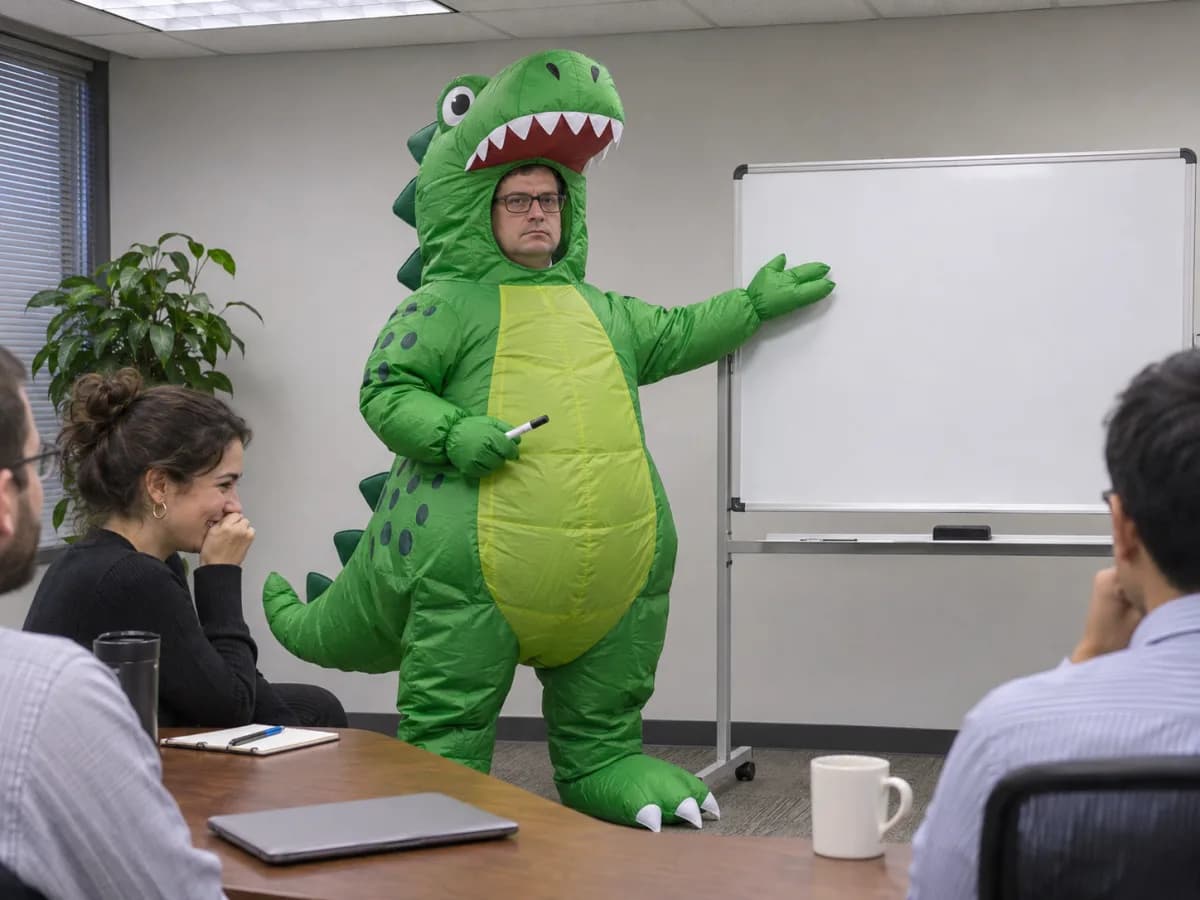
A deadpan adult in an inflatable green dinosaur costume presents a blank whiteboard to coworkers in a conference room. Cool fluorescent light, candid eye-level office photo, no text.
Use this templateEdit an uploaded photo
Use the uploaded photo as a reference. Keep the subject, expression and lighting. Add a bright yellow rubber duck sitting on their shoulder. Leave the rest of the scene as close to the original as possible.
Use this templateChange one detail in the office dinosaur prompt
The office picture puts a green dinosaur costume in an ordinary meeting. The presenter keeps a straight face and points at a blank whiteboard. Open “Create a funny picture from text” to start with this prompt.
For a variation, swap the dinosaur suit for a red lobster costume. Keep the expression, whiteboard, and eye-level camera. Choose a supported aspect ratio and check the credit estimate before you generate.
Check a thumbnail of the result. If the costume or the person’s face is hard to make out, ask for a closer view that keeps both in frame.
Make your own photo funny
Open “Edit an uploaded photo” in Image Studio. Use a model that accepts reference images and add a clear photo you have permission to use. The starter prompt asks for a yellow rubber duck on the subject’s shoulder while keeping their expression and lighting.
Change just the prop for a variation. Compare the result with your original before sharing. Check the face and lighting, or look at the coat markings if you used a pet photo.
Three funny picture ideas to try
Absurd office photo: “A deadpan adult in an inflatable green dinosaur costume presents a blank whiteboard in a conference room, eye-level candid photo, no text.” Pet joke: “A serious orange cat inspects a miniature roadworks site, tiny unbranded safety vest, damp pavement, documentary photography.” Reaction picture: “An adult in a raincoat stares in disbelief at a tiny paper umbrella while rain pours behind them, close-up, plain background.”
Make the joke easy to read on a phone
Look at the result as a thumbnail. If the prop disappears, bring it closer to the face or ask for a simpler background. If the reaction looks stiff, describe what the face is doing, such as one raised eyebrow or a jaw dropping mid-sentence. Change one detail per revision so you can see what helped.
Save room for a caption if you want a meme
A funny photo can work on its own. For a captioned meme, ask for a clean area above or beside the subject, then add the exact words in your editor. A square crop works well for a reaction image in chat, while a vertical crop gives a full-body gag more room on a phone screen.
FAQ
- Do I need to upload a photo?
- No. Use a text prompt for an invented character or scene. Upload a reference only when you want to start from a specific photo and your selected model supports it.
- Will the edited picture still look like me?
- A clear reference can help. Ask the model to keep the face and change only the prop, outfit, or background, then check the result before sharing.
- How can I make the result look like a candid photo?
- Ask for an eye-level camera, ordinary room lighting, and a specific moment in the scene. Leave out terms like cartoon or caricature if you want a photographic look.
- Can I animate the picture afterward?
- Yes. Use your finished picture as a starting frame in Video Studio with a compatible image-to-video model. Describe one simple motion, like a slow double take.
- How many credits does a funny picture cost?
- The cost depends on the selected model and settings. Check the estimate in Image Studio before you generate.
Related generators
- AI Friendship Photo Generator for Two Friends
- AI Group Photo Generator
- AI Influencer Generator
- AI Avatar Generator — Consistent Faces
- AI Caricature Generator
- AI Fashion Model Generator
- AI Flight Attendant Generator
- AI Girl Generator
- AI Office Lady Generator
- AI Portrait Generator
- AI Soft Girl Portrait Generator
- AI Action Figure Generator