Features
AI Oil Painting Generator
By Ofrai Editorial (Use Case Research)
An AI oil painting generator renders images with the physical signatures of oil paint: loaded brushstrokes, glazed shadows, warm underpainting showing through, and canvas weave at the edges. On Ofrai you open Image Studio, choose a live model, and describe the painterly behaviour you want rather than the medium alone. You can generate from scratch, or supply a reference photo and ask for a painted interpretation. Every run uses the same credit balance as text and video, so style exploration is affordable.
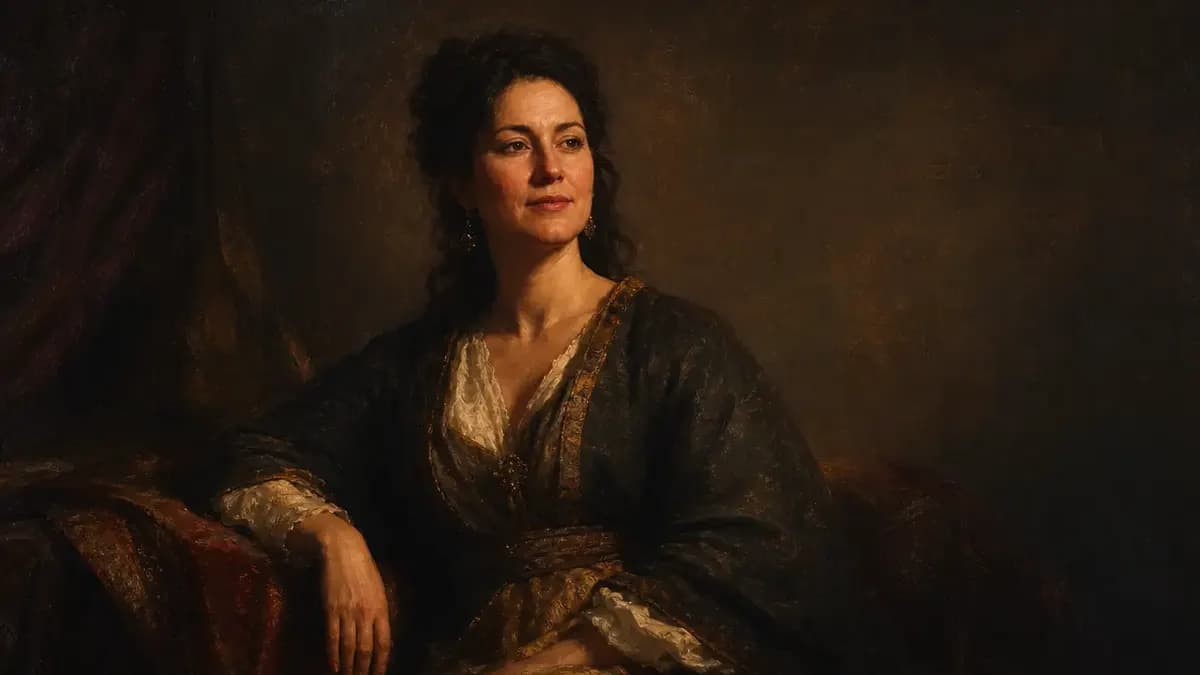
New accounts include 1 free GPT Image 2.5 generation. Other models and video use credits.
Example prompts
Impasto oil strokes, layered color
Alla prima against layered glazing
Two painting methods produce very different results and they need different prompt language. Alla prima is wet-on-wet, fast, and reads as confident visible strokes: 'loose alla prima brushwork, paint applied wet-on-wet, bold direct strokes, unpainted ground showing at the edges'. Layered glazing builds depth in transparent passes: 'smooth layered glazing, deep translucent shadows, luminous underpainting, refined blended surface, almost no visible brush direction'. Pick one per run. Asking for both gives you muddy mid-tones, because the two methods resolve edges in opposite directions.
Describing brushwork, not just the medium
Saying 'oil painting' tells the model very little. Say what the brush does instead: 'short choppy strokes in the foliage', 'long confident drags across the sky', 'palette-knife highlights on the water', 'thick loaded impasto in the highlights, thin paint in the shadows'. Impasto specifically means paint standing proud of the surface, and naming it is the fastest way to get visible texture. Name the brush in two or three areas of the frame and let the rest be handled by the overall description.
Palette direction for skin, sky, and shadow
Oil painting has a specific colour logic: warm shadows, cool highlights, and a coloured ground showing through. Say it directly — 'warm ochre ground, shadows tinted burnt sienna, highlights in pale cool blue'. For skin, 'flesh built from warm reds and ochres with cool green-grey half-tones' prevents the waxy plastic look. For skies, name the painter rather than the pigment: 'sky with a Turner-like luminous cloud shift' reads better than 'orange and blue sky'.
Keeping a limited palette of five or six colours produces more convincing paint than a long colour list.
Impasto, canvas weave, and edge quality
The three texture cues that sell oil paint are height, weave, and edge. Height is impasto in the lights and thinner paint in the darks — 'paint physically standing up in highlights, thin scumbles in the shadows'. Weave is 'visible linen canvas texture, coarse weave showing through thin paint at the edges'. Edge quality is the most underrated: 'lost and found edges, some edges crisp and some dissolving into the background'. Real paintings do not have uniform edges, and that inconsistency is what a flat render lacks most.
Painters' subjects versus photographic sources
You can generate an oil painting two ways. With a reference photo, the render becomes an interpretation, which is what you want for a portrait of someone specific: 'paint this portrait as a 19th-century studio oil, three-quarter view, restrained background'. Without a reference, you describe a scene the tradition already contains — 'a lone fisherman mending nets on a jetty at dawn, muted harbour greys with one warm accent'. The second route gives more painterly freedom because nothing is being preserved. Pick the route based on whether likeness matters.
Prompt recipes for four classic oil looks
Loose landscape: 'Coastal cliffs at dusk, long confident brush drags in the sky, thick impasto on the lit grass, thin paint in the shadowed rock, warm ochre ground, lost edges in the distance, 3:2'. Studio portrait: 'Three-quarter portrait, deep umber background, flesh built from warm reds and ochres with cool half-tones, confident visible brushwork, no detail in the hair, 4:5'. Still life: 'Table with lemons, a pewter jug and linen, palette-knife highlights, deep glazed shadows, classical arrangement, 3:2'.
Painterly abstract: 'Loose alla prima landscape study of a harbour, three colours only, spontaneous and unfinished-looking at the corners, 1:1'.
Which Ofrai model holds painterly output best
flux-2 gives you the fastest loop for testing brush language, and it is where to spend credits while you work out the style. gpt-image-2 is the safer pick for portraits where the face must stay readable and the composition restrained, since it holds form while restyling. nano-banana-pro carries surface texture best, so it is the finishing pass when impasto, canvas weave, and small edges matter most. seedream-5 leans stylised and illustrative, which suits decorative oil-illustration work rather than faithful painted likenesses.
Common oil-render failures and their fixes
Texture tends to appear only in one area — usually the foreground — because you described it locally. Fix it by naming stroke behaviour across two or three regions of the frame. Faces turn to mush because you asked for heavy impasto on a small area; fix it by adding 'face rendered smoothly with minimal visible brush direction'. Uniform edges make the render look like a filter, so add 'lost and found edges'. And if the palette drifts pastel, constrain it: 'limited palette of five colours, earth tones dominant'.
Five painting prompts across different methods
Each prompt below names a different way the brush behaves, so they produce visibly different pictures rather than one look re-rolled. Alla prima landscape: "coastal cliffs at dusk, wet-on-wet application, long confident drags in the sky, thick pale impasto on the lit grass, thin transparent shadow on the rocks, warm ochre ground showing through, edges lost in the distance, 3:2."
Glazed portrait: "three-quarter view of a woman, deep umber background, flesh built from warm reds and ochres glazed in thin layers with cool green-grey half-tones, restrained brushwork, hair massed rather than detailed, 4:5." Palette-knife still life: "lemons and a knife on a dark table, paint lifted with a palette knife, hard broken edges, thick ridges of yellow paint standing above the surface, deep unmodulated shadow, 1:1."
Loose figure: "a standing figure painted in six loose strokes, anatomy suggested rather than outlined, warm ground, cool background wash, visible bare canvas at the edges, 2:3." Reference interpretation: "paint this photograph as a 19th-century studio portrait, restrained background, flesh built from warm reds and ochres, visible brushwork in the clothing, smooth face, 4:5."
Resolution, detail, and canvas settings that change the paint
Four settings behave differently here than in photography. Resolution: render large, because impasto ridges and canvas weave are sub-pixel cues that disappear at small sizes. Detail strength: lower it for an alla prima look and raise it for a glazed one; too much detail turns every passage into a smooth digital surface with no paint in it. If the tool exposes a stylisation control, set it mid-range and correct with words instead — the words survive a re-roll, a slider setting you forget does not.
And always ask for the canvas edge explicitly ("unpainted canvas visible at the borders") if you plan to crop to a triptych.
Signs the paint is not really oil
Four tells separate an oil painting from a photo with a filter, and all four are diagnosable. Surface relief: if you can see no ridge, no drag, and no height change anywhere, it is a filter. Colour logic: oil shadows are warm and highlights cool; a render with cool shadows and warm highlights is describing a photograph, not a painting. Edge variety: paintings have lost edges where a form dissolves into the background; renders tend to outline every object evenly.
Brush direction: strokes follow the form or the light, and they vary in length. If all your strokes run the same way and the same length, the image reads as a texture overlay. Fixing any one of these means adding a specific painting clause, not adding more adjectives.
What a set of six painted interpretations costs
Style exploration is genuinely cheap, so budget by method rather than by picture. Scout: ten flux-2 frames across two methods, because switching from alla prima to glazing produces a different picture entirely and you should see both before committing. Lock: one gpt-image-2 frame per method to confirm brushwork and structure, since structure is what a reference photo needs preserved. Produce: one nano-banana-pro frame each on the six keepers, which is the deliverable set. Roughly sixteen renders covers six finished paintings.
On Ofrai they all draw from a single credit balance. The trap here is rendering every canvas at full size during exploration; oil textures are legible at half size, so settle the method small and render large only once per keeper.
How this differs from illustration, watercolour, or a photo filter
A watercolour workflow depends on transparency and blooms: pigment pooling at wet edges, paper white left untouched, hard-edged washes. Oil is opaque and physical — it covers, it builds height, and it hides what is underneath, which is the opposite behaviour. Digital illustration depends on clean line and flat shape. And a filter over a photograph changes only colour, leaving photographic depth of field, perspective, and edge behaviour intact, which is exactly the tell this page exists to remove.
Use a watercolour page when you want the paper to show through, use illustration when you want clean readable shapes, and use this page when you want the paint to have body.
Examples
FAQ
- What makes an AI image look like oil paint rather than a filter?
- Three cues: paint height, canvas weave, and inconsistent edges. Describe impasto in the highlights with thin scumbles in the shadows, name visible linen weave showing through thin paint at the edges, and ask for lost and found edges rather than uniform sharpness. Uniform edges and flat lighting are the two things that most often make a painterly render look like an overlay.
- Should I upload a photo or write a text prompt for an oil painting?
- Upload a photo when likeness matters, and ask for a painted interpretation such as 'paint this portrait as a 19th-century studio oil'. Write a text-only prompt when you want painterly freedom, because the model can then choose the composition the tradition would have used. Mixing the two often produces a photo with a texture filter rather than a painting.
- How do I stop faces turning to mush in oil-style renders?
- Heavy impasto on a small feature destroys the structure. Keep the face smooth and reserve visible brushwork for clothing, background, and edges: 'face rendered smoothly with minimal visible brush direction, brushwork concentrated in the fabric and background'. If the face still drifts, rerun the same prompt on gpt-image-2, which holds form better during restyling.
- What does alla prima mean and when should I use it?
- Alla prima is wet-on-wet painting applied in a single session, producing bold direct strokes with the ground often visible. It suits loose landscapes, harbour studies, and unfinished-looking work. Layered glazing, described as 'smooth layered glazing, deep translucent shadows, luminous underpainting', suits refined portraits and still lifes. Asking for both in one prompt produces muddy mid-tones.
- Can I control the colour palette of a generated oil painting?
- Yes, and it matters more than the medium word. Constrain the palette to a small number of colours and name the ground: 'limited palette of five colours, earth tones dominant, warm ochre ground, shadows tinted burnt sienna'. Also name the shadow hue and the highlight hue separately. Long colour lists produce mud, while a small palette with a clear warm-shadow and cool-highlight structure reads as intentional paint.
- Do I need separate oil-painting software, or does this run inside Ofrai?
- It runs inside Ofrai. This page deep-links into Image Studio, where you select a live model, paste the prompt or attach a reference, and generate using the same credits as text and video. Finished paintings are stored in your library, so you can generate a style series and revisit any frame for another pass.
Related generators
- AI Classical Portrait Generator
- AI Black And White Photo Generator
- AI Caricature Generator
- AI Chibi Character Generator
- AI Cozy Anime Art Generator
- AI Cozy Winter Wallpaper Generator
- AI Crayon Drawing Generator
- AI Instant Film Photo Generator
- AI Liminal Space Image Generator
- AI Luxury Photo Generator
- AI Minimalist Photo Generator
- AI Old Money Photo Generator