Features
AI Liminal Space Image Generator
By Ofrai Editorial (Use Case Research)
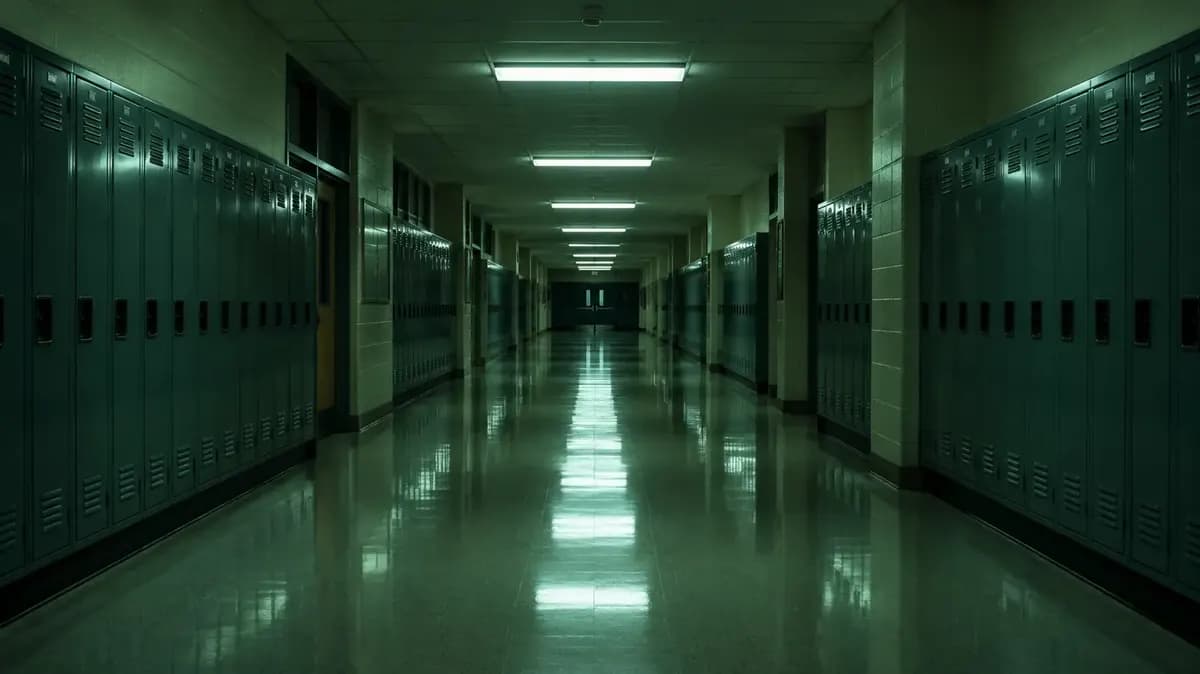
Generate an empty school hallway, a mall after closing, a motel corridor or a midnight pool. Open any of the four prompts in Ofrai Image Studio. For the hallway shown here, try changing the lighting while keeping the camera and green locker rows in place.
New accounts include 1 free GPT Image 2.5 generation. Other models and video use credits.
Example prompts
Empty high school hallway
An empty American high school hallway after hours, rows of dark green metal lockers on both sides, cool fluorescent ceiling lights reflecting on the polished floor, double doors at the far end, centered eye-level photograph. No people, readable text, or logos.
Use this templateMall food court after closing
A suburban American shopping mall food court after closing, chairs stacked on laminate tables, a lone paper cup beside a planter, dim fluorescent lights reflected in speckled terrazzo, eye-level early-2000s digital snapshot with restrained grain. No people, readable storefront signs, or logos.
Use this templateMotel corridor at dawn
An empty indoor corridor in a roadside motel before sunrise, repeating doors, worn geometric carpet, cool blue daylight through the window at the far end, one warm wall sconce still on. Eye-level photograph, straight walls, no people or readable room numbers.
Use this templateIndoor pool at midnight
An empty municipal indoor pool at midnight, photographed from the short end at standing eye level. Pale blue tiles, still water reflecting two fluorescent ceiling strips, a straight stainless-steel ladder on the right, and one dark doorway at the far end. Keep the pool edge straight and the room in focus. No swimmers, readable signs, or logos.
Use this templateTry one lighting change in the school hallway
Open the “Empty high school hallway” prompt in Ofrai Image Studio. Keep the camera at eye level and the double doors centered at the far end. Check the credit estimate before generating.
For a second version, replace “cool fluorescent ceiling lights” with “one fluorescent strip near the far doors.” Keep the locker rows and camera position fixed.
Compare how far the reflection reaches along the polished floor. If the rows lean or the doors shift off center, specify straight locker rows and centered far doors before trying another change.
Pick a place people normally pass through
Start with a hallway, food court, lobby, or waiting room. Give the image a clear time of day: a school after the last activity ends or a motel before checkout. A stack of chairs or lights left on can suggest the place was in use a few hours ago.
Check the pool layout before changing the light
Open the “Indoor pool at midnight” prompt and keep the camera at the short end of the pool. Check that the ladder meets the deck and that the tile lines follow the pool edge. If the lines bend, simplify the layout before changing the lighting.
Use materials that make the place recognizable
Dark green metal lockers and a polished floor suggest a school. Speckled terrazzo and laminate tables suggest a mall food court. Choose a few materials that belong together, then describe how the overhead light falls on them.
Adjust the mood one detail at a time
Start with a maintained space and one clue that makes the emptiness feel unusual, like a paper cup on a cleared floor. Try changing the time of day or leaving a single light on. Keep the camera and room description fixed so you can compare the effect.
Build a series around one location
Save the frame with the clearest layout and carry its floor, lighting, and wall materials into the next prompt. If the model accepts reference images, add that frame when you move to another room. Check the studio's credit estimate before generating each variation.
To use the empty room as the first frame of a clip, follow the photo-to-video guide and check that the door frames and floor lines hold during the camera move.
Examples
FAQ
- Do I need a reference photo?
- No. Each example starts with text. You can add a photo you have permission to use if the selected model accepts reference images.
- How do I keep people out of the image?
- Describe the room as closed or after hours and end the prompt with “no people.” Remove words like busy or crowded, even if they describe what the place is usually like.
- Can I make a mall look eerie without making it abandoned?
- Describe closed shutters, stacked chairs, working lights, and clean floors. A small trace of use, like a cup beside a planter, can carry the mood.
- What aspect ratio works for an empty hallway?
- A wide frame shows both rows of lockers and the vanishing point. A vertical frame puts more attention on the ceiling lights and their reflections. Choose an aspect ratio your model supports.
- How many credits does a liminal space image cost?
- The estimate depends on the selected model and settings. You can see it in Image Studio before generating.
Related generators
- AI Minimalist Photo Generator
- AI Black And White Photo Generator
- AI Instant Film Photo Generator
- AI Luxury Photo Generator
- AI Old Money Photo Generator
- AI Caricature Generator
- AI Chibi Character Generator
- AI Classical Portrait Generator
- AI Cozy Anime Art Generator
- AI Cozy Winter Wallpaper Generator
- AI Crayon Drawing Generator
- AI Fantasy Creature Generator