Features
AI Luxury Photo Generator
By Ofrai Editorial (Use Case Research)
An AI luxury photo generator has to make expensive objects read as expensive, and that depends on how light behaves on the surface rather than on adjectives like premium or high-end. On Ofrai you open Image Studio with nano-banana-pro, gpt-image-2, flux-2, and seedream-5 and write prompts built around materials: polished metal, bevelled glass, heavy silk, brushed leather. Describe the reflection shape and the size of the specular highlight, keep the product in a clean studio, and the luxury register follows from the rendering rather than from the styling.
New accounts include 1 free GPT Image 2.5 generation. Other models and video use credits.
Example prompts
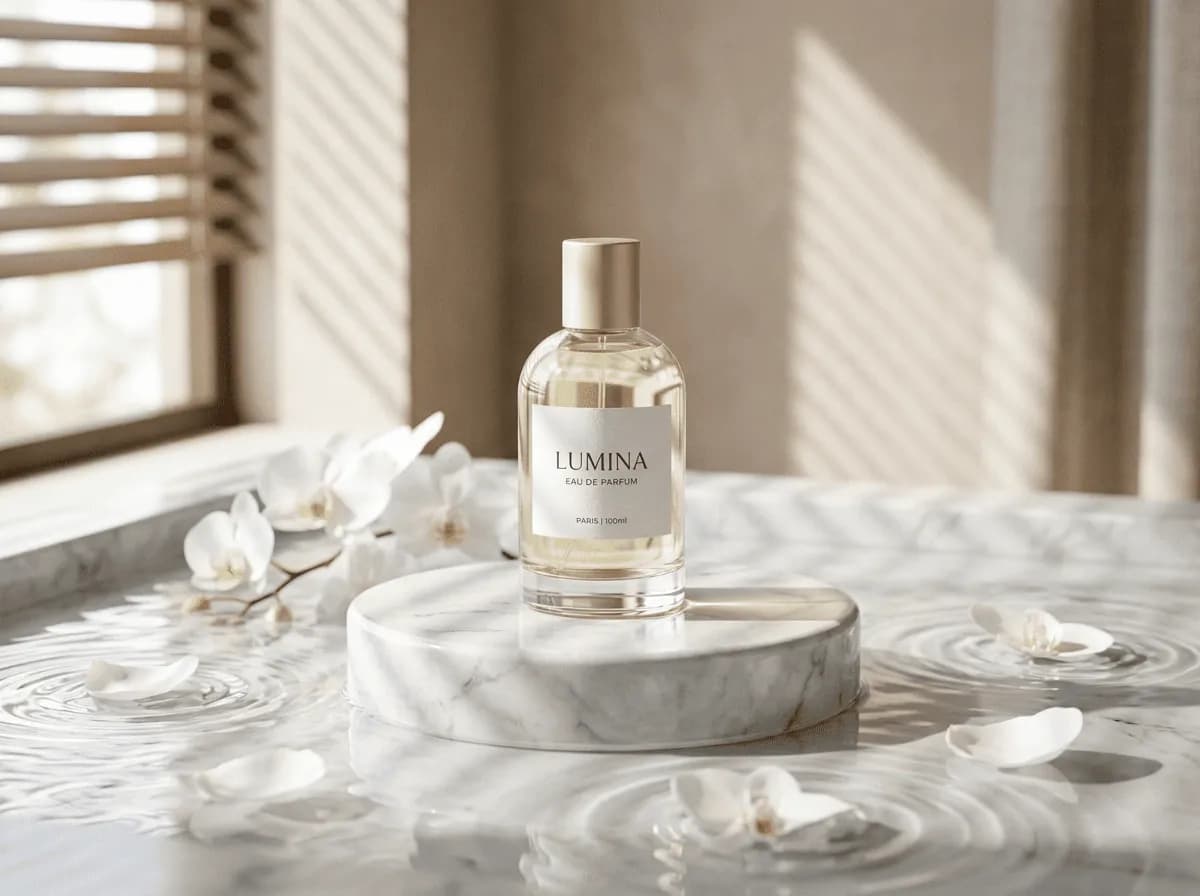
Luxury perfume bottle still life, marble pedestal, white orchids on water, blind-filtered soft light, minimal commercial photo
Why luxury reads as material, not adjectives
Luxury in a still image is a rendering decision. It shows up in the sharpness of a reflection edge, the shape of the specular highlight on a metal curve, the way a bevel catches a thin line of light, the weight of a fabric fold. Words like premium, luxurious, and high-end do almost nothing, because they describe emotion rather than optics. Replace them with material and light instructions: "polished stainless steel with a clean mirror reflection of the softbox," "thick glass base refracting the surface beneath."
The register emerges from the physics you describe.
Controlling reflections and specular highlights
Reflection shape is the fastest way to change whether a product looks expensive. A large soft rectangle reflection in brushed metal reads as controlled studio lighting; scattered, noisy reflections read as cheap. Name the shape explicitly — "single large softbox reflection as a clean rectangle in the surface," or "two narrow strip lights creating two parallel highlights." For glass and gemstones, describe refraction: caustics on the surface below, a bright edge where the bevel catches light, a dark core inside the material.
Uncontrolled highlights are the most common reason a luxury render looks synthetic.
Setting up a studio product scene
Keep the environment simple so the object is the subject: a seamless sweep in a single neutral tone, a stone or lacquer plinth, one obvious light source plus a white bounce card. Ask for a defined contact shadow rather than a floating object, because a product with no ground contact instantly reads as a render. Specify the camera too: "shot at product level with a 100mm macro lens, shallow depth of field on the front edge."
For jewellery and small objects, macro language and a low camera height do more for perceived value than any amount of styling.
Materials that need different prompt language
Write a separate clause per material, because one generic description flattens everything into plastic. Silk: "heavy silk with deep folds and anisotropic sheen." Leather: "full-grain leather with visible pore texture and soft edge wear." Marble: "honed marble with subtle veining, not polished gloss." Gold: "brushed gold with a warm specular line rather than a mirror finish." Mixing a brushed finish and a mirror finish in one object produces an incoherent surface, so pick one finish per material and state it.
Editorial and campaign variants
Luxury work is rarely one hero image. Build a set from one lighting clause: hero shot, three-quarter detail, a top-down layout of the same object, and a texture crop. Vary the crop, not the lighting, and the set reads as one campaign shot on one day. For lifestyle luxury — a watch on a wrist, a car interior, a hotel lobby — specify the environment carefully but keep the product dominant in the frame; these models tend to spend detail on scenery unless you say otherwise.
Which Ofrai model to use for luxury stills
gpt-image-2 gives the most photographic surface rendering and is the safest default for reflective and transparent materials. nano-banana-pro follows a long, material-heavy prompt most faithfully, which matters when you are specifying several surfaces at once. flux-2 is fast and cheap for testing compositions and plinth choices. seedream-5 handles lifestyle environments and wide scenes where the product occupies part of the frame rather than the whole of it.
Failure modes and their fixes
Plastic-looking products come from omitting material texture — add pore, weave, or grain detail for the surface you named. Floating objects mean you never described grounding; add a defined contact shadow and a surface. Over-styled sets drift into fashion editorial, which is a different brief; restate that the product is the subject and the background is minimal. Blown highlights that clip to pure white kill material read, so specify the highlight as bright but not clipped. And plastic-looking typography on packaging means you should set that type yourself.
Five luxury still-life prompts you can use as written
Watches: "a luxury chronograph on a dark stone plinth, brushed steel case, a single large softbox reflection shaped as a clean rectangle, one narrow strip light raking across the dial, soft gradient background from charcoal to near black, defined contact shadow, 100mm macro, product is the subject, background minimal." Glassware: "a cut-crystal decanter on a reflective black surface, hard specular edges, caustic light patterns cast on the surface behind, deep shadow side, no props."
Leather goods: "a full-grain leather handbag on a cream cyclorama, visible pore texture and slight edge wear, warm key light from the left, a single soft shadow, editorial product photography." Jewellery: "a gold ring photographed from slightly above, brushed gold with one warm highlight line, black velvet below, shallow depth of field, luxury still life." Interiors: "a luxury car interior, matte stitched leather, brushed aluminium trim, soft window light, no reflection of a photographer." Every one names the plinth or surface, the shape of the reflection, and the shadow.
Those three clauses are the whole difference between expensive and cheap.
Three lighting rigs you can copy from a single softbox
Most luxury stills come from one of three light rigs, and naming the rig is far more reliable than describing "dramatic lighting". Single softbox: "one large rectangular softbox to the left and slightly above, a clean rectangular reflection in the surface, gentle gradient falloff." Two strips: "two narrow vertical strip lights forming two parallel highlight lines down the length of the object."
Rim plus fill: "a hard rim light from behind and to the right with a large soft fill from the front left, leaving one side of the object dark." Choose one and write it out fully rather than stacking all three, because stacking is what produces the over-bright, plastic result you are trying to avoid.
Settings that decide how reflective and transparent materials render
Three settings matter more for luxury work here than almost anything else in the prompt. Resolution: render large, because a specular edge at 1024 pixels turns into a staircase the moment a client zooms in. Batch size: two or three at a time, since judging luxury work is a slow visual task and a large batch actively makes it harder.
What a luxury campaign set costs in credits
Treat a set as three passes, because the expensive mistakes all happen in the first one. Scout: eight cheap flux-2 frames to test the plinth, the background tone, and the light rig without committing. Lock: one gpt-image-2 frame at high resolution, because reflective and transparent surfaces are decided there. Produce: two renders each of the four shots you actually need — hero, three-quarter detail, top-down layout, texture crop — which is eight. Around seventeen renders covers a full mini-campaign.
On Ofrai they all draw on one credit balance, so you can scout on a fast model and finish on a photographic one. Lifestyle versions that put a person in the frame cost noticeably more, because hands and skin are now in play; budget roughly double for those.
Grading and export settings that keep highlights from clipping
Luxury is the context where highlight clipping is most fatal, because a blown specular is precisely the cue that reads as cheap. State it explicitly: "specular highlights bright but not clipped, visible detail inside the brightest highlight." When exporting, work in a format that preserves that headroom and check the histogram rather than trusting the image on screen, because most screens compress highlights and will hide a clipped channel.
For a product going to print, deliver one master with the highlights deliberately held two stops below clipping and let the retoucher push them in a controlled layer. Grading done inside the generator tends to crush blacks to pure black, which is what makes AI luxury work look like it has no air in it.
How this differs from a packshot or a cutout workflow
A packshot workflow optimises for catalogue accuracy: pure white background, no props, even lighting, the product filling a fixed percentage of the frame, and colour calibrated against a standard. That is deliberately the opposite of luxury work, which optimises for mood and uses shadow, surface, and environment to imply price. A product cutout workflow optimises for the reverse of this page entirely — transparent background, no shadows, edges prepared for compositing into a marketplace listing.
Use a packshot when the image must sit in a grid of a hundred similar items, a cutout when the image will be placed inside someone else's layout, and this page when a single image has to carry the perceived value of the product.
FAQ
- How do I make a product look genuinely expensive?
- Describe materials and light behaviour rather than mood. Words like premium or luxurious describe emotion and do almost nothing. Instead specify that the metal carries a clean softbox reflection, the glass base refracts the surface beneath, and the bevel catches a thin line of light — that is what perceived value actually is.
- Why does my luxury render look like plastic?
- The prompt is almost certainly missing material texture. Add the grain that belongs to the surface you named: pore detail for leather, weave for silk, subtle veining for honed marble, and a consistent finish per material. Mixing a brushed and a mirror finish on one object also produces an incoherent surface.
- How do I control reflections and specular highlights?
- Name the reflection shape explicitly, for example a single large softbox reflected as a clean rectangle, or two narrow strip lights producing two parallel highlights. For glass and gemstones, describe refraction too: caustics on the surface below and a bright edge along the bevel. Uncontrolled highlights are the main reason luxury renders look synthetic.
- Should the background be styled or minimal?
- Minimal. A seamless sweep in one neutral tone, a stone or lacquer plinth, and one clear light source keep attention on the object. Over-styled backgrounds tend to pull the frame toward fashion editorial and the models spend their detail on scenery unless you state that the product is the subject.
- How do I build a consistent luxury campaign set?
- Generate a hero shot, a three-quarter detail, a top-down layout, and a texture crop from the same product, and vary the crop rather than the lighting. Holding the lighting clause identical across frames makes the set read as one campaign photographed on one day.
- Which Ofrai model is best for luxury product photography?
- gpt-image-2 gives the most photographic rendering of reflective and transparent surfaces. nano-banana-pro follows material-heavy prompts most faithfully when several surfaces are named, flux-2 is cheapest for testing compositions, and seedream-5 handles lifestyle scenes where the product is part of a wider environment.
Related generators
- AI Black And White Photo Generator
- AI Instant Film Photo Generator
- AI Liminal Space Image Generator
- AI Minimalist Photo Generator
- AI Old Money Photo Generator
- AI Caricature Generator
- AI Chibi Character Generator
- AI Classical Portrait Generator
- AI Cozy Anime Art Generator
- AI Cozy Winter Wallpaper Generator
- AI Crayon Drawing Generator
- Ecommerce Product Listing Images