Features
AI Transparent Product Assets
By Ofrai Editorial (Use Case Research)
A transparent product asset is a cutout with an alpha channel. You can use Ofrai to draft the isolated product, then inspect the downloaded file before placing it on a new background.
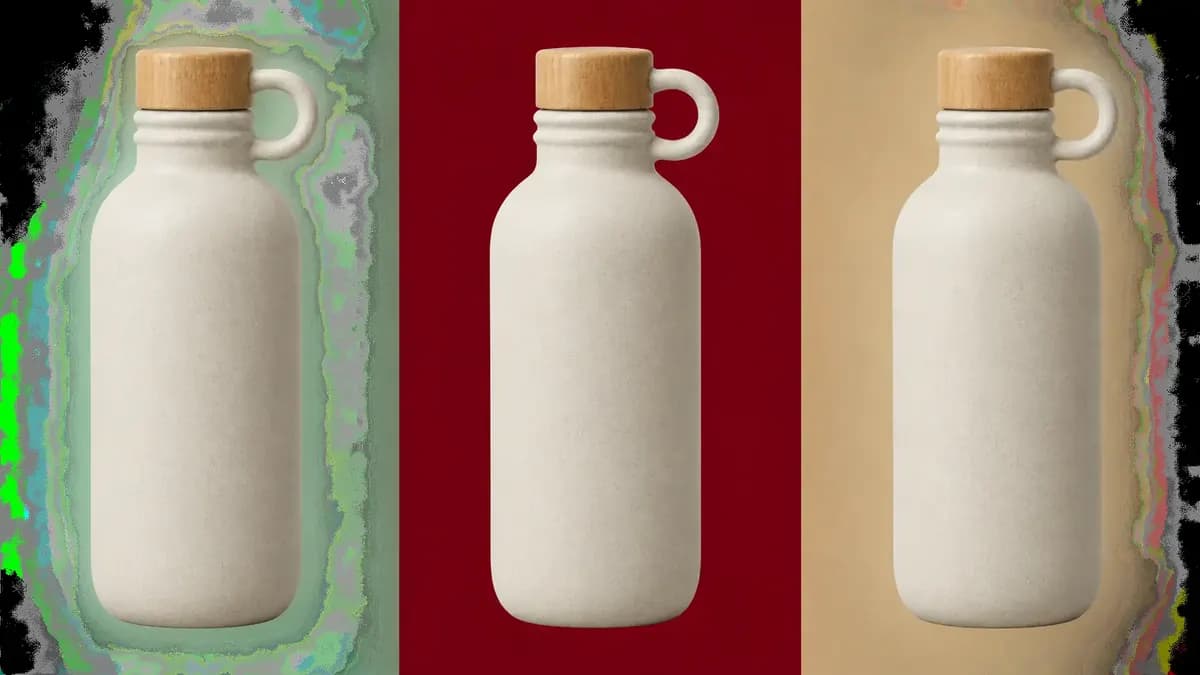
New accounts include 1 free GPT Image 2.5 generation. Other models and video use credits.
Example prompts
Transparent-background product asset, clean edges
What an AI transparent product assets set has to satisfy
Four non-negotiables: a genuine alpha channel rather than a white rectangle, a clean edge with no background colour bleeding into semi-transparent pixels, consistent shadow logic across the set, and enough resolution for the largest placement. Anything less produces assets that fail QA at the compositing stage rather than in the generator, which is the expensive place to discover it. Decide the largest placement size first, because that sets the resolution you must generate and the shadow rule you must keep.
Prompting for alpha, not for white
State it as a production requirement: “isolated product on a fully transparent background, alpha channel, no backdrop, no gradient behind the subject, soft contact shadow only”. Distinguishing no backdrop from white background matters, because a model given a white instruction may return a white field with no transparency. Download the model’s result and inspect it in an image editor. If the background is opaque, remove it in a design tool and save a PNG with an alpha channel. Renaming a file to PNG does not add transparency.
Verify the alpha channel in a design tool before you build a whole layout around an asset that turns out to be a flat white image.
Consistent shadows across a set
Decide one shadow rule for the whole set and state it in every prompt: no shadow for catalogue listings, soft contact shadow for web product pages, or a grounded directional shadow for hero placements. A set where half the items float and half are grounded reads as careless no matter how good each render is. Include the surface in the same phrase so the shadow has something to fall on.
Building a catalogue set efficiently
For a large catalogue, run a cheap engine such as flux-2 for shape tests, then produce the approved list on gpt-image-2 or nano-banana-pro. Compositing many approved cutouts in your design tool is faster and far more consistent than asking a single prompt for a full arrangement. Name each file by product and version as you approve it, because the tenth render is otherwise impossible to trace back to the ninth.
Transparent assets from real product photos
Upload each existing product photo as a reference and ask for background removal with the product preserved exactly. nano-banana-pro is the strongest editor for this because it conditions on your pixels rather than rebuilding the object. State the label, cap or handle explicitly, since unnamed details are the first things an editing model will tidy away. Shoot the reference evenly lit and on a plain surface where you can, because a busy original gives the model a busy cutout.
Choosing the model for AI transparent product assets
Use gpt-image-2 for constraint-heavy briefs where the alpha requirement, shadow rule and preserved product details must all hold together. Use nano-banana-pro for reference-led background removal and for scene swaps that keep the product intact. Use flux-2 for high-volume, low-cost shape and pose tests. Use seedream-5 when the assets must carry legible on-pack text or a brand lock-up.
Run one difficult product through all four before committing a catalogue, since edge behaviour differs more between models than headline quality suggests.
Quality control before export
Check four things at 200 percent zoom: the edge for halos, the interior for leftover background tone, the shadow for grounding, and the silhouette for stray floating fragments. Then confirm the file actually has an alpha channel in your design tool before committing to a batch. For very large placements, generate at the highest available resolution rather than upscaling, because upscaled edges soften. A five-minute zoom check per approved asset costs far less than a reprint.
Three production prompts with true alpha
Single product on alpha: “Amber glass perfume bottle standing upright, fully isolated subject, genuine transparent background with nothing behind the glass, soft top-left key light, subtle rim light along the right edge, faint contact shadow only, no surface, no reflection of any environment, centred with even margin, 1:1.” Asset with shadow: “Matte black aluminium laptop, closed, three-quarter view, isolated on transparency, soft grounded contact shadow beneath the base, no ambient occlusion on any other side, clean edges, 4:3.”
Multi-angle set: “The same white ceramic mug shown from three angles, front, side and top-down, identical scale and identical lighting in all three, isolated on transparency, no shadows other than a single soft contact shadow, consistent handle position relative to the frame.” The alpha-relevant phrase is always the same one: isolated subject, transparent background, no surface. Everything else in the prompt is lighting.
Resolution, aspect ratio and the export format
Two numbers decide whether an asset is usable. Resolution should match the largest placement at roughly twice its size: a product displayed 800 pixels wide on a page needs about 1600 pixels of source, and anything less shows soft edges the moment a shopper zooms. Aspect ratio should be the shape of the product plus its margin, not a generic square — a tall bottle in a square wastes half the canvas and shrinks further when the layout fits the image to its box.
Download the model’s result and inspect it in an image editor. If the background is opaque, remove it in a design tool and save a PNG with an alpha channel. Renaming a file to PNG does not add transparency. If the destination needs WebP or AVIF transparency, convert there rather than exporting a second lossy source.
Reference settings for a matched asset set
An asset set is only usable if every piece was made under identical conditions, and a prompt alone will not hold lighting constant. Where the product is physically the same across the set — the same mug, or one bottle in several colours — prefer a reference over a description, since a described object is reinvented every time while a referenced one is copied. Turn the reference off only when a genuinely new shape joins the catalogue.
What a production catalogue run costs
Asset production is the clearest case for splitting exploration from finishing. Discovery is cheap: a forty-SKU catalogue can be explored as thumbnails on flux-2 to settle the light direction, camera height and margin, at a small fraction of the finishing cost. Finishing is where the money goes, because every approved SKU needs a final render at full resolution on gpt-image-2 or nano-banana-pro, and roughly one in six needs a second attempt for an edge or a shadow problem.
A forty-SKU catalogue therefore lands somewhere around sixty to seventy final renders. Every generation displays its Ofrai credit cost before it runs, and the same balance covers every other format you produce.
Why alpha channels come back wrong
Four causes account for nearly every transparent-asset failure. A white or pale halo means the original background bled into semi-transparent edge pixels, fixed by regenerating against a flat white reference or by running a decontamination pass. A hard clipped edge on glass or mesh means the model treated transparency as an object rather than a material, so describe the transmissive part explicitly.
A shadow that vanishes on dark backgrounds was rendered into the file rather than added by the layout, which is why “no shadow” is often the correct production instruction.
How this differs from a white-background packshot
A packshot is a photograph-style frame: the product sits on a visible surface, the shadow belongs to that surface, and the file is usually opaque. A production asset with alpha is a component rather than a picture, and it has to survive being placed on white, on grey, on a coloured panel and in dark mode, which is a stricter test than looking good on one background.
The practical consequence is that you should never judge an alpha asset by opening it on a white page — view it on two contrasting backgrounds or you will accept halos that appear immediately in production. And if your layout has a fixed surface that never changes, a packshot is cheaper, faster and safer, because there is no alpha to get wrong.
Examples
FAQ
- How do I get a product image with a transparent background on Ofrai?
- Use “isolated subject, transparent background, no backdrop” to describe the intended result. Download the model’s result and inspect it in an image editor. If the background is opaque, remove it in a design tool and save a PNG with an alpha channel. Renaming a file to PNG does not add transparency. If the result comes back on a white field, ask explicitly for the subject cut out onto transparency, since a white-background instruction often returns an opaque image.
- Can Ofrai remove backgrounds from my existing product photos?
- Yes, and this is the reliable route for catalogue work because the product comes from your pixels rather than from a description. Upload the photo, name the details that must survive such as the cap, label or handle, and use an editing model such as nano-banana-pro, which conditions on the image you supplied.
- How do I keep a whole catalogue set looking consistent?
- Check the settings shown for the selected model, and preview the output before running a batch. Compositing the approved cutouts in your own design tool is faster and more consistent than prompting for a whole arrangement at once, which usually produces mismatched lighting.
- Should product assets include a shadow?
- It depends on the placement. Catalogue listings that need a pure cutout work best with no shadow. Web product pages usually look right with a soft contact shadow. Hero and advertising placements can take a grounded directional shadow. Whatever you choose, apply the same rule to every item in the set.
- Why does my transparent asset show a white or dark fringe?
- Because the original background colour bled into semi-transparent edge pixels during generation. Regenerate with an explicit request for clean edges and a fully removed background, and inspect at 200 percent zoom. For very large placements, generate at the highest available resolution instead of upscaling, since upscaling softens the edge.
- Can transparent product assets be used commercially?
- Commercial use depends on the model and model terms of the engine you select, so check the model page before publishing. Keep a record of the prompt, model and date for each approved asset, and if you used a real product photo as a reference, confirm you have the right to use that photograph in your marketing.