Features
AI Packshot Generator
By Ofrai Editorial (Use Case Research)
An AI packshot generator produces the standardised product images an online catalogue needs: the product centred, edges clean, the background tone consistent across every shot, and a shadow that sits correctly on the surface. On Ofrai you open Image Studio, choose a live model, describe the product, surface, and lighting rig, and generate. Once the hero shot is right, the same prompt with a changed camera angle produces a consistent secondary set, and all frames run on the credit balance you already use for text and video.
New accounts include 1 free GPT Image 2.5 generation. Other models and video use credits.
Example prompts
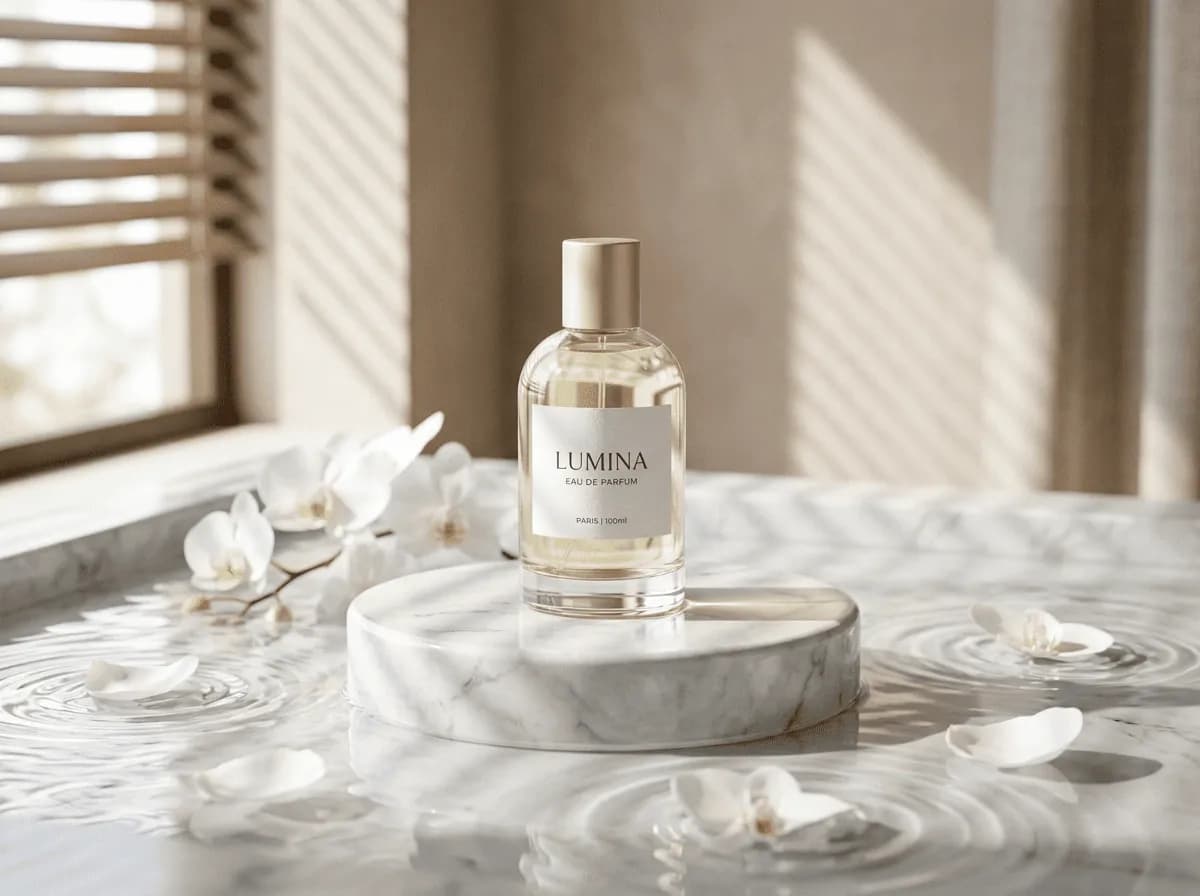
Luxury perfume bottle still life, marble pedestal, white orchids on water, blind-filtered soft light, minimal commercial photo
What an AI packshot generator has to get right
Commercial product images have a short checklist: correct proportions, a clean silhouette, a controlled shadow, colour that matches the physical product, and a background tone you can repeat. Generators usually handle the first three and fail the last two. The reason is that background and product colour are described in words, which is imprecise. Fix it by locking phrasing: reuse the identical surface and lighting sentences across the whole set, and change only the camera line. Consistency across frames matters more than any single beautiful image.
Reflection and shadow control on surfaces
Reflective packaging is where packshots break. Glossy bottles reflect whatever the model imagines, so describe the light source and the reflector instead of the mood: 'large softbox from the upper left, white bounce card on the right, two narrow strip highlights on the glass shoulder'. Matte and textured surfaces need the opposite: 'no specular highlights, soft broad falloff, surface texture clearly visible'. Shadow type should be named — 'soft contact shadow directly under the product' for a floating look, or 'defined reflection on the polished floor' for a grounded one.
Pick one per set.
Keeping labels and packaging text readable
Small print is the hardest thing in product imagery. You will not get accurate label typography from a text prompt, so plan around it. Either generate a clean packshot with a blank or neutral label area and composite the real artwork afterwards, or describe the label only by colour and shape: 'matte ivory label block across the lower third, text area left blank, small circular mark at the top'. Upload the actual packaging as a reference image when exact reproduction matters.
Never ask for legible wording and then ship whatever letters appear.
Shot lists: hero, angle, scale, and detail
A complete listing needs four framings. Hero, at 4:5 or 1:1: 'product centred, front view, entire product visible with even margins'. Three-quarter angle: 'rotated 30 degrees, showing the side panel and cap'. Detail crop: 'macro view of the closure and the texture of the surface'. Scale shot: 'product beside a plain neutral object for scale, both on the same surface'. Generate the hero first and use its wording as the base for the rest. Mixing phrasing between framings is why catalogue sets look inconsistent.
Backgrounds: seamless, gradient, or context
Three background families work commercially. Seamless: 'pure white seamless background, no horizon line, even illumination, soft contact shadow'. Gradient: 'smooth top-to-bottom gradient from pale grey to white, no visible texture'. Context: 'minimal kitchen counter in soft neutral tones, product in focus, background blurred'. For marketplaces that require pure white, generate the seamless version first and composite onto exact white if needed. Never ask for both a context and a seamless background in one prompt; the result is a hybrid that satisfies neither catalogue requirement.
Prompt recipes for three AI packshot packaging types
Glass dropper bottle: 'Amber glass dropper bottle with a matte black cap, standing on a pale grey seamless surface, large softbox from upper left, white bounce card right, two narrow strip highlights on the glass shoulder, soft contact shadow, straight-on view, 4:5'. Kraft pouch: 'Matte kraft stand-up pouch with a die-cut window, front view, soft broad light with no specular highlights, paper texture clearly visible, slight natural crease at the base, 1:1'.
Cosmetic compact: 'Round powder compact, closed, on a polished pale stone slab, three-quarter angle showing the hinge, defined reflection beneath the product, warm neutral grade, 4:5'.
Matching an Ofrai model to product fidelity
flux-2 is the exploration engine: use it to test surface wording, camera angles, and shadow type cheaply before committing. gpt-image-2 gives the most commercially usable result for structured products because it holds geometry and edges while you refine. nano-banana-pro holds small surface detail and material character best, which makes it the right choice for textured packaging and detail crops. seedream-5 is useful for lifestyle-adjacent context shots where atmosphere matters more than exact product geometry.
When a real studio shoot beats a render
Generated packshots are strong for catalogues, concept decks, marketplaces in early stages, and pre-production visualisation before a product exists physically. A real shoot is still better when the product is a complex object with many angles and moving parts, when colour accuracy is legally or clinically important, or when the brand has an existing visual system that must be matched to the pixel. Generated colour drifts slightly, so confirm the hero frame against the physical sample before you print or publish at scale.
Turning one hero frame into a full listing set
The hero frame is the master, and everything else is derived from it. Once a hero lands, keep its exact background sentence, surface sentence, and light sentence, then change only the camera clause: "product centred, front view, entire product visible with even margins, 4:5"; "rotated three-quarters, cap and label visible, same lighting, 4:5"; "close crop on the label area, shallow depth of field, same lighting, 1:1"; "product beside a small scale reference, same surface and background, 3:2".
Because the three shared sentences are byte-identical, the set matches the way a studio matches — same backdrop paper, same light flags, same polariser. When you attach the approved hero as a reference image for the derived shots, carry the same three sentences too; the reference carries colour and surface, and the sentences carry everything else.
Surface, camera, and shadow settings that hold across frames
Four settings decide whether a set looks like one shoot. Camera distance: state it as a framing, not a lens alone — "product filling about seventy percent of the frame height" survives a re-roll better than "shot on an 85mm". Shadows: name the type, because "soft shadow" gets interpreted as anything from a light tent to a three-head rig; "one soft key from the upper left with a gentle contact shadow directly under the base, no cast shadow to the right" does not.
Surface: write the material once and reuse it verbatim, because a surface described differently between frames is the fastest way to lose consistency. Background tone: give it a value rather than a name — "pale neutral grey, approximately 85 percent white in the centre falling to 70 percent at the corners" reproduces far more consistently than "light grey backdrop".
Checks that catch commercial rejections
Four checks catch most of what marketplaces reject. Edge quality: zoom to 200 percent on the silhouette. Haloed or chewed edges against the background mean the product was composited rather than rendered, and buyers do catch this on zoom. Proportion: compare the product against a known dimension; if your catalogue requires a size reference, include one in the hero rather than adding a text overlay later.
Colour: check that the product colour matches the physical sample, because text description cannot guarantee it — this is the one item on the list that genuinely requires a human with the sample in hand. Completeness: confirm the entire product is visible in the hero with even margins, since a cropped base is the most common reason a listing is rejected.
What a twelve-image listing set costs in credits
Catalogue work scales predictably. Scout: eight flux-2 frames to lock the surface wording, the shadow type, and the framing, because those three are reused across every frame you will ever render. Lock: two gpt-image-2 frames on the hero, since geometry and edges are decided there and packshots have no tolerance for a warped cap or a floating label. Produce: twelve nano-banana-pro renders from the approved hero as reference. That is around twenty-two renders for a complete listing.
On Ofrai all of it draws from one credit balance, so you can scout cheaply and finish on the photographic model without a plan change. When a client later asks for a second colourway, the scouting and locking passes are already done and only the twelve production frames are repeated.
How this differs from a lifestyle or transparent cutout
A lifestyle workflow places the product in a believable scene with props and a surface in use, and it deliberately relaxes catalogue consistency in exchange for story. A transparent cutout workflow removes the background entirely and prepares clean edges for compositing into someone else's layout — which is the opposite requirement, since a cutout has no shadow and no surface. This page sits between them: the surface and shadow are real and consistent, but the environment is reduced to a clean commercial field.
Use a lifestyle workflow when the listing needs to sell a feeling, use a cutout when the image will be dropped into a marketplace template, and use this page when the product itself has to survive scrutiny at full size.
FAQ
- How do I get consistent backgrounds across a whole packshot set?
- Reuse the exact same surface and lighting sentences in every prompt and change only the camera line. Consistency across frames matters more than the quality of any single image. If you need pure white for a marketplace, generate a seamless version first and composite onto exact white rather than asking for both seamless and context in one prompt.
- Can AI packshots show readable label text and logos?
- Not reliably from a text prompt. Small typography is the most common failure in generated product imagery. Either generate the packshot with a neutral or blank label area and composite your real artwork afterwards, or describe the label by colour and block only, such as 'matte ivory label block, text area left blank'. Upload the actual packaging as a reference when exact reproduction matters.
- How do I control reflections on glossy packaging?
- Describe the light rig rather than the mood. For gloss: 'large softbox from upper left, white bounce card on the right, two narrow strip highlights on the glass shoulder'. For matte and textured surfaces say the opposite: 'no specular highlights, soft broad falloff, surface texture clearly visible'. Also name the shadow type you want, either a soft contact shadow or a defined reflection on the floor.
- Which shots does a complete product listing need?
- Four framings cover most catalogue requirements: a hero shot showing the entire product with even margins at 4:5 or 1:1, a three-quarter angle rotated about 30 degrees to reveal the side panel, a macro detail crop of the closure or surface texture, and a scale shot beside a neutral object. Generate the hero first and reuse its wording for the rest to keep the set consistent.
- Which Ofrai model is best for accurate product images?
- gpt-image-2 for structured products because it holds geometry and edges while you refine. nano-banana-pro for textured packaging and detail crops, since it preserves small surface character best. Use flux-2 to explore surface wording, camera angle, and shadow type cheaply before committing to a final model.
- Can I use generated packshots for a real online store?
- Yes for concept catalogues, marketplaces in early stages, and pre-production visualisation, but check the model page's commercial terms and your Ofrai plan first. Generated colour drifts slightly, so verify the hero frame against the physical product before printing at scale or committing to a large print run.
Related generators
- Ecommerce Product Listing Images
- AI Product Cutout Generator
- AI Product Photo Generator
- AI Transparent Product Assets
- AI Action Figure Generator
- AI Fashion Model Generator
- AI Game Cover Art Generator
- AI Logo Generator
- AI Luxury Photo Generator
- AI Thumbnail Generator
- AI Animal Generator for Pet Photos and Wildlife
- AI Avatar Generator — Consistent Faces