Features
AI Product Cutout Generator
By Ofrai Editorial (Use Case Research)
Use an image model that accepts reference photos to try a clean white background or an isolated product. Check the edges, label and file format before publishing.
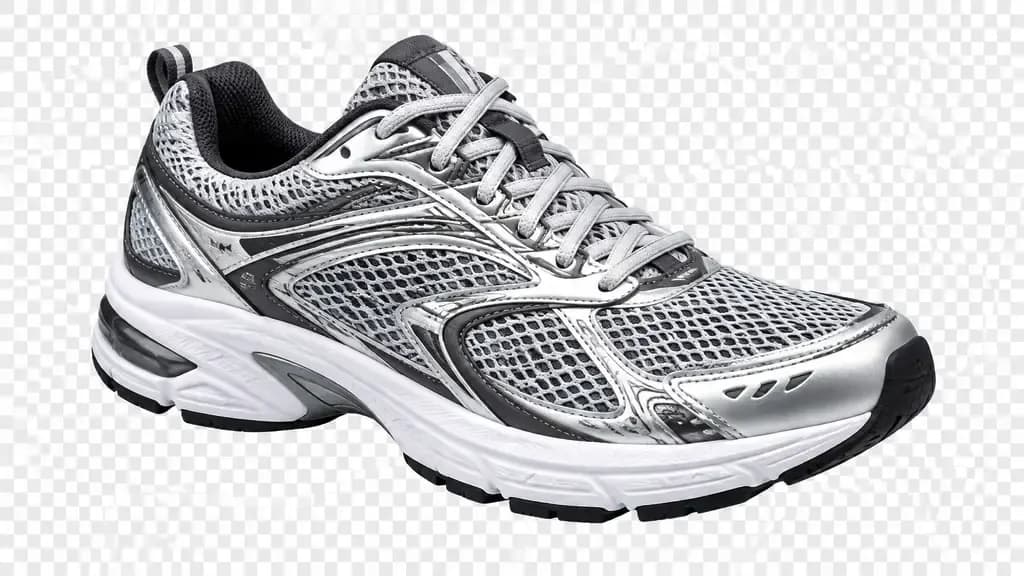
New accounts include 1 free GPT Image 2.5 generation. Other models and video use credits.
Example prompts
Product cutout on white, e-commerce hero feel
What counts as a usable cutout
A usable cutout has four properties: no halo of the original background along the edge, no clipped semi-transparent surfaces like glass or mesh, a shadow that matches the surface it sits on, and enough resolution to survive a marketplace zoom. Marketplace thumbnails render small, so edge quality matters more than pixel count. Judge the result by zooming to 200 percent on the hardest edge in the frame — usually a handle, a strap, or hair-like trim — rather than by the overall impression at full size.
Prompting a clean studio-background removal
Be explicit about what should remain. A prompt that works: “Remove the grey studio background and the surface, keep the bottle, cap, and printed label exactly as they are, place it on pure white, soft key light from the upper left, faint contact shadow under the base, no props.” Naming the label and cap keeps the model from redesigning them. Asking for a scene instead — “on a marble counter” — turns a cutout into a lifestyle render, which is a different job with different expectations.
Reference images and shadow logic
Upload the original photo as a reference when the product shape is unusual; the image-edit models follow a reference far more reliably than they reconstruct a described object. Then state the shadow separately: “no shadow” for catalogue listings that need a pure cutout, “soft contact shadow” for web product pages, “hard directional shadow” for a studio look. If the model keeps the old background, say “fully remove the original background” rather than “clean background”, which reads as a request for tidying, not removal.
Which Ofrai model suits which job
Use gpt-image-2 for instruction-heavy jobs where you must specify exactly what survives and what disappears — it holds hard constraints best. Use nano-banana-pro when you are re-cutting a photo and want the original product preserved while the scene changes; it is the strongest editor of the four. Use flux-2 for fast, cheap composition tests and for clean product shapes with few occlusions.
Use seedream-5 when the product copy includes on-pack text or when the same product needs several scene variants in one style.
Edge failures and the fix for each
Green fringe along the edge: the background colour bled into semi-transparent pixels — regenerate with an explicit request for edge decontamination, or re-run with the background described as flat white. Missing thin parts such as watch straps or chain: raise image resolution for that pass. A shadow that floats: describe the surface as a real plane with contact distance.
Matching the aspect ratio across a set
Fix the aspect ratio before you start — 1:1 for marketplace main images, 4:5 for social product posts, 3:2 for catalogue spreads — and keep it identical across a set, because a changing frame makes a listing look inconsistent. Vary one variable per pass: background first, then angle, then prop. Chained changes are why a set drifts, and they are hard to walk back.
Where a generated cutout is the wrong tool
Do not use this for products whose exact geometry is legally or commercially critical — technical drawings, machined parts, jewellery with visible hallmarks. Those need a real photo retoucher or a vector tool where the measurement is the deliverable. It is also the wrong tool for a product with heavy internal transparency, such as tinted sunglasses or a filled water bottle, where photographic falloff cannot be recovered from a description. For lifestyle hero shots, generate the scene rather than pretending to cut out the original.
Three worked prompts for one product
Start with the catalogue pass: “Isolate the amber glass diffuser bottle and its brushed aluminium collar, transparent background, no backdrop, no props, keep the embossed volume markings legible, soft top light, faint contact shadow, 1:1.” Then the web pass, same prompt with “warm off-white seamless backdrop, soft gradient, no visible horizon line, product centred with 8 percent margin.” Then the marketplace pass: “pure white background, shadowless, product at 85 percent of frame height, colour accurate, no gradient.”
Three deliberate prompts teach you more than thirty improvised ones, and the approved version becomes a template for the rest of the catalogue.
What to do when the model keeps the background
If the original scene survives two or three good-faith attempts, stop re-prompting the image model and change the job. Composite instead: generate a clean version of the product on flat white for the lighting and surface you want, run a conventional background-removal tool over that generated frame to produce the alpha, then place it back into your layout.
This hybrid keeps the generative model doing what it is genuinely good at — light, material and style — while a deterministic tool handles the matte, which is the part that must be exact. It is also the faster route for a fifty-SKU catalogue, because the masking step scripts cleanly while each generation still gets human review.
Where the credits actually go
Cost follows model tier, resolution and the number of candidates per run, so the lever you control is iteration count rather than price per image. A disciplined cutout run spends most of its budget on the first composition pass and spreads the remainder across one refinement each for the frames that matter. Firing a full four-image batch before approving a single frame is the usual way to overspend.
Explore shape and shadow on flux-2 at low resolution, approve the frame, then re-render only that composition on nano-banana-pro or gpt-image-2. Every generation shows its Ofrai credit cost in Image Studio before you run it, and credits come from the same balance as your video and text work.
Settings that stop the model redesigning your product
Two choices are worth making before you generate. Aspect ratio should match the destination so nothing gets cropped later: 1:1 for marketplace main images, 4:5 for social, 3:2 for catalogue spreads. Prompt length runs the opposite way from most creative work — on cutout jobs, short and literal beats long descriptive prose, because every extra adjective is another chance for the model to improve your packaging.
Who gets real value from generated cutouts
The approach pays off for sellers with many SKUs, one consistent visual system, and a tolerance for a rendered look — small jewellery brands, print-on-demand catalogues, marketplace resellers, and anyone rebuilding a listing set after a rebrand. Skip it when the product is a technical drawing, a machined component, a gemstone where clarity grade is the selling point, or anything a buyer measures against the listing image.
Hybrid sellers usually do best: generate the hero set and the scene work, then photograph or scan the two or three frames where physical accuracy is the entire argument.
Thirty seconds of checking beats an hour of re-prompting
Before a cutout leaves your library, spend thirty seconds on three checks that catch almost every rejection. First, open the frame at 200 percent zoom on the hardest edge and look for a halo of the original backdrop — a one-pixel ring of grey or green around a cap or a strap. Second, look for the inverse problem: a hard, chalky cut where a soft edge used to be, which means semi-transparent material was clipped rather than preserved.
Third, drop the cutout onto a mid-grey fill and then a near-black one; a matte that looks clean on white often reveals itself as grey haze on dark.
Examples
FAQ
- Can Ofrai cut out a product from my own photo?
- Yes. Upload the photo as a reference in Image Studio, choose an image model that supports editing, and describe what to keep and what to remove. nano-banana-pro and gpt-image-2 both handle photo-based edits better than pure text-to-image models, because they condition on the pixels you supplied instead of inventing a new product.
- How do I get a transparent background instead of white?
- Use “isolated subject, transparent background, no backdrop” to describe the intended result. Download the model’s result and inspect it in an image editor. If the background is opaque, remove it in a design tool and save a PNG with an alpha channel. Renaming a file to PNG does not add transparency. Check the edge at 200 percent zoom: models occasionally leave a faint white halo where a semi-transparent edge blended with the removed backdrop.
- What is the difference between a cutout and a packshot?
- A cutout isolates the product from its original background while keeping the original photography. A packshot is a styled studio render — controlled backdrop, deliberate lighting, often props — that may not correspond to any real photo. A cutout suits resizing existing listings; a packshot suits building a new visual system.
- Why does my product shape change between generations?
- Shape drift happens when the model has freedom to re-imagine the object, which is common when you describe the product only in text. If the product has exact proportions that matter, cut it from a real photo rather than generating it.
- How much do product cutout generations cost on Ofrai?
- Each generation shows its Ofrai credit cost in Image Studio before you run it, and cost varies by model and resolution. A practical workflow is to lock composition on a cheaper engine such as flux-2, then produce the final cutouts on a premium model. All of it draws on the same credit balance as video and text work.
- Can I cut out several products at once?
- You can, but single-product prompts are more reliable. A multi-product prompt tends to blur edges between objects and to invent extra items. Check the settings shown for the selected model, and preview the output before running a batch.