Features
AI Sexy Girl Generator
By Ofrai Editorial (Use Case Research)
An AI sexy girl generator produces glamorous portraits of adult women — fully clothed, editorial in tone, and built from lighting and wardrobe direction rather than nudity. On Ofrai you write the brief in Image Studio, pick an image model, and iterate on wardrobe, pose and camera until the frame looks like a campaign still. Consent and age boundaries apply to every subject.
New accounts include 1 free GPT Image 2.5 generation. Other models and video use credits.
Example prompts
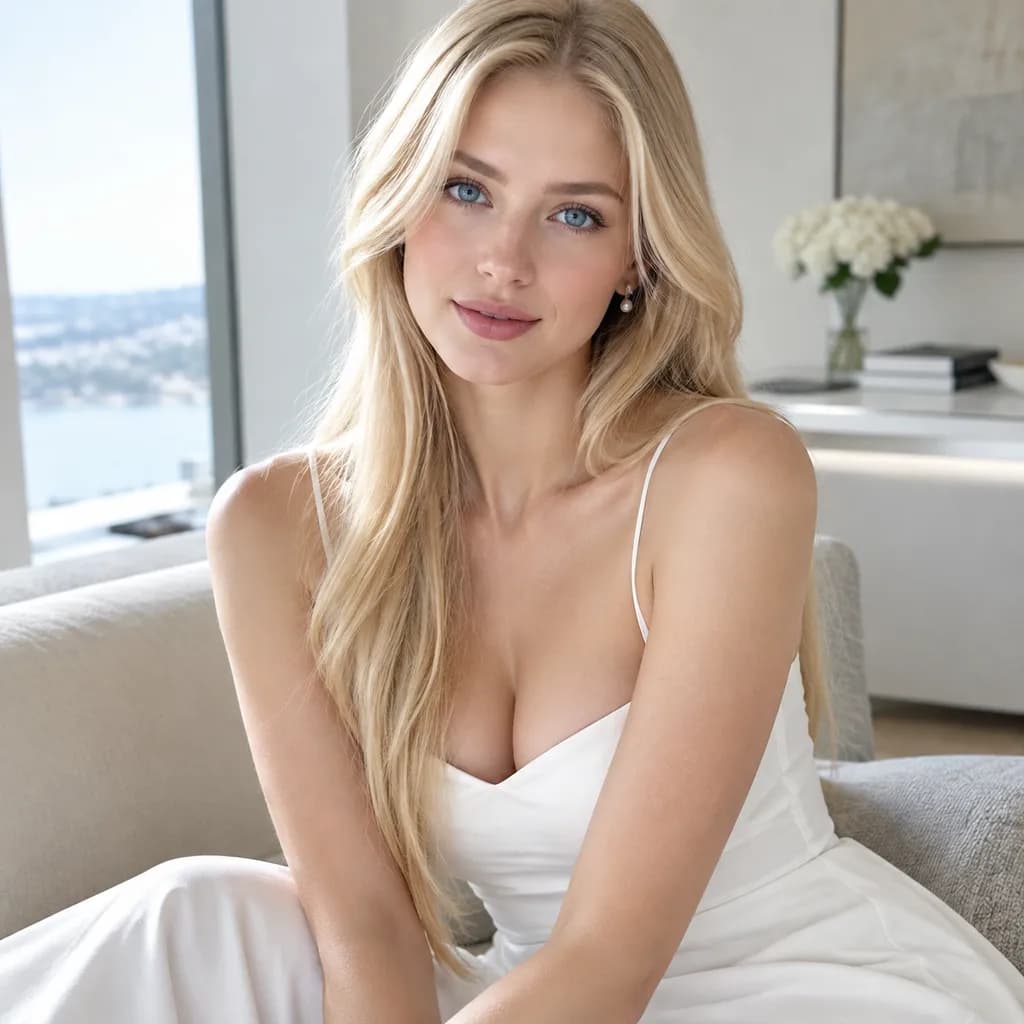
Adult blonde fashion model in a refined white evening dress, seated in a bright modern apartment, soft window light, tasteful glamorous editorial photography.
How to write a brief an AI sexy girl generator will follow
Glamour comes from specific, filmable choices, not vague adjectives. Replace attractive with things a photographer could stage: low-key lighting with a single hard source, a satin slip dress in bottle green, body angled three-quarters to camera, chin lifted, one hand at the waist, wet-look hair pushed back. Naming material, light direction and camera height gives the model something to render; naming sexiness alone gives it a default to imitate.
Keep the frame to one idea, since a second prop or second outfit immediately dilutes the mood you were building.
Lighting and lens carry the mood
One large soft source at 45 degrees plus a dim rim behind the shoulder reads as cinematic and flattering. Hard side light with deep shadow reads as fashion editorial. Direct flash on a plain background reads as a party snapshot. For lens behaviour, ask for a compressed telephoto look with shallow depth of field for the intimate frames, and a wider lens with visible environment for confidence shots. Change one lighting variable at a time, not the whole look.
Wardrobe and styling an AI sexy girl generator renders cleanly
Materials with a clear specular behaviour render better than vague ones: satin, leather, silk, sequins and fine jewellery all catch light in ways the model can reproduce. Avoid asking for fine text on garments, since lettering is unreliable, and avoid extreme garment physics such as heavy wind or flowing fabric across the face, which smears. Simple jewellery, well-fitted tailoring, and one strong colour per frame keep the result legible at thumbnail size.
Pose direction that survives a still frame
Pose language is more reliable than pose names. Say what the body is doing and where the weight sits: “weight on the back leg, hips angled away from camera, shoulders open, direct eye contact, relaxed jaw”. Avoid contorted or anatomically extreme poses, which produce broken hands and impossible joints. For a set, change the pose and wardrobe per frame but keep the lens and light identical so the series holds together.
Choosing an Ofrai model for portrait work
Start with the image models currently available in Image Studio and compare a small draft on the same brief. A reference-capable model may suit wardrobe or background edits from an approved portrait; a text-first model may suit a new fictional character. If the frame needs lettering, inspect the text at full size before using it. Model availability and results vary, so use the studio's live controls and credit quote rather than assuming one model will always win.
Rendering failures and how to fix them
Watch for hands and fingers fusing, jewellery merging into skin, fabric texture swimming, and skin that looks plastic at high contrast. Fix hands by changing the pose description rather than adding “perfect hands”. Fix plastic skin by specifying the light source and asking for visible skin texture and pores. Fix fused jewellery by naming one item instead of several. Skin tones drift when unspecified, so state tone and lighting together rather than separately.
Non-negotiable boundaries
Every subject must be a clearly adult, fictional person. Do not generate, and do not attempt to prompt around, any depiction of minors or of any real identifiable individual without their consent. Keep results clothed and non-explicit. Commercial use — campaigns, social posts, subscription content — depends on the model and model terms you select, so check the model page before you publish. When in doubt about how a brief would read out loud, rewrite it.
Worked prompts for three AI sexy girl editorial moods
High-fashion editorial: “Full-length editorial portrait, adult model in a sculptural black coat against a concrete stairwell, one hand in pocket, chin slightly lifted, a single hard key light from above with deep falloff, 85mm at f/2, full body in frame, confident stillness, muted colour grade, no smile.” Glamour beauty: “Head and shoulders beauty portrait, bare shoulders, satin backdrop in warm grey, beauty dish slightly above eye level, catchlights in both eyes, minimal makeup with visible skin texture, 100mm, relaxed direct gaze into the lens.”
Silk campaign: “Silk slip dress, standing three-quarter, warm low sun through a window casting a hard shadow on the wall behind, 50mm, waist up, weight on the back leg, fabric texture clearly visible, fine film grain.” Each prompt states wardrobe, pose, light, lens and framing, so nothing is left to improvise. Each also states what is not wanted, because “nothing improvised” is the entire point.
Aspect ratio and references for a series
Choose a ratio supported by the selected model that fits the final placement, then keep that framing consistent across the set. When the same fictional adult should appear again, upload an approved image as a reference if the model supports it and describe only the new wardrobe, pose or background. Compare each result against the reference because facial details can still drift. Leave the reference out when you want a range of different fictional faces.
Image Studio shows the controls available for the model you selected; it does not offer a universal seed control.
Budgeting a portrait shoot directed in text
Make one draft first, then check the face, hands, fabric and framing before paying for another variation. Change one part of the brief at a time and keep the approved image if you need a reference for the next frame. If several models are available, compare their displayed credit estimates and use an affordable draft option before a final pass. There is no reliable fixed number of generations for a five-frame set: the cost depends on the selected model, settings and how many revisions you choose.
Why these prompts fail on the first pass
Four predictable problems. The model over-smooths skin because “flawless” or “perfect” reads as an instruction to erase pores, so replace it with “natural skin texture, visible pores, minimal retouching.” Hands get mangled when the pose implies gripping something, so write “hands relaxed at her side” or crop above the wrist. Fabric turns plastic because satin and silk were named without weight or drape, so add “heavy silk with visible drape, soft specular highlights, no plastic sheen.”
And a pose reads as staged when the direction names an action instead of a weight distribution, so describe where the weight sits rather than what the subject is doing. Change one of these at a time; changing all four usually produces a different person.
Consent, likeness and what you may publish
Generate adults only, and say so in the brief when it matters: “adult woman in her late twenties” is both a useful anchor and a useful safeguard. Never prompt a named real person, a celebrity likeness, or a recognisable public figure — those are not creative decisions but legal exposure, and most platforms and rights holders treat them that way. If you use a real reference photograph of someone who has not consented, you have no permission to publish the output, however flattering the result is.
Label generated images where the destination requires it, read the terms of the specific model before commercial use, and keep prompt history alongside the final files, because the record of what you asked for matters if a complaint arrives.
How this differs from catalogue and lookbook work
Glamour portrait work optimises for appeal and atmosphere, which is why the prompt leans on mood, skin and lighting rather than on accuracy. An editorial portrait is a commission about a person or a garment, where the brief, the styling and the rights are the hard part and the image is only the deliverable. A catalogue or lookbook portrait is closer to a product photograph with a model attached, where consistency of the garment matters more than consistency of the expression.
If your output has to prove a garment’s colour, cut or drape, treat the job as product photography instead. If your output exists to carry an atmosphere, you are already on the right page.
For stylized adult fashion and portrait briefs, see 3D editorial portraits, fashion glamour portraits, and playful costume portraits.
To plan movement and framing for an adult editorial concept, use the editorial video workflow.
FAQ
- Does Ofrai’s sexy girl generator create nude or explicit images?
- No. This page covers clothed, editorial-style glamour portraits of adult women, which is what the technique actually needs in order to look like photography. Requests for nudity, for minors, or for real identifiable people without their consent are out of scope and should not be attempted.
- How do I make the portrait look less AI-generated?
- Give the model filmable direction instead of adjectives. Name the light source and its position, the camera height, the lens behaviour, the fabric, and what the subject is doing with her weight and hands. Generic requests get generic output; specific staging instructions give the model something concrete to render.
- Can I keep the same woman across several images?
- An approved image can guide later variations when the selected model supports references. Describe only the new pose, wardrobe and framing, then compare faces carefully; exact identity matching is not guaranteed.
- Which model should I try for a glamour portrait?
- Choose from the models currently available in Image Studio. Try a reference-capable model for edits to an approved image or a text-first model for a new fictional adult, then compare the results and the displayed credit estimate. Check any lettering at full size before publishing.
- Why do hands and jewellery look wrong in my results?
- Hands fuse and jewellery merges with skin because the model is solving an ambiguous shape. The fix is usually to simplify rather than to add instructions: change the pose so the hands do something clearly readable, and specify a single jewellery item instead of a stack. Saying perfect hands rarely changes the outcome.
- Can I use these portraits commercially?
- Commercial rights depend on the model and model terms for the engine you choose, so check the model page and your plan before publishing. Keep your own records of the prompt, model and date for each approved image, and never present a generated person as a real individual.
Related generators
- AI Action Figure Generator
- AI Animal Generator for Pet Photos and Wildlife
- AI Avatar Generator — Consistent Faces
- AI Black And White Photo Generator
- AI Caricature Generator
- AI Character Sheet Generator
- AI Chibi Character Generator
- AI Classical Portrait Generator
- AI Cozy Anime Art Generator
- AI Cozy Winter Wallpaper Generator
- AI Crayon Drawing Generator
- AI Creature Wallpaper Generator