Features
AI Realistic Video Generator
By Ofrai Editorial (Use Case Research)
An AI realistic video generator turns a written shot description into footage that reads as captured rather than drawn, including correct motion, depth and lighting over several seconds. On Ofrai you write the brief in Video Studio, choose a model that matches the shot, and use an uploaded still as the frame the clip grows from. Every render sits in your library, ready to extend into a longer sequence.
Chat and video use credits from your Ofrai balance.
Example prompts
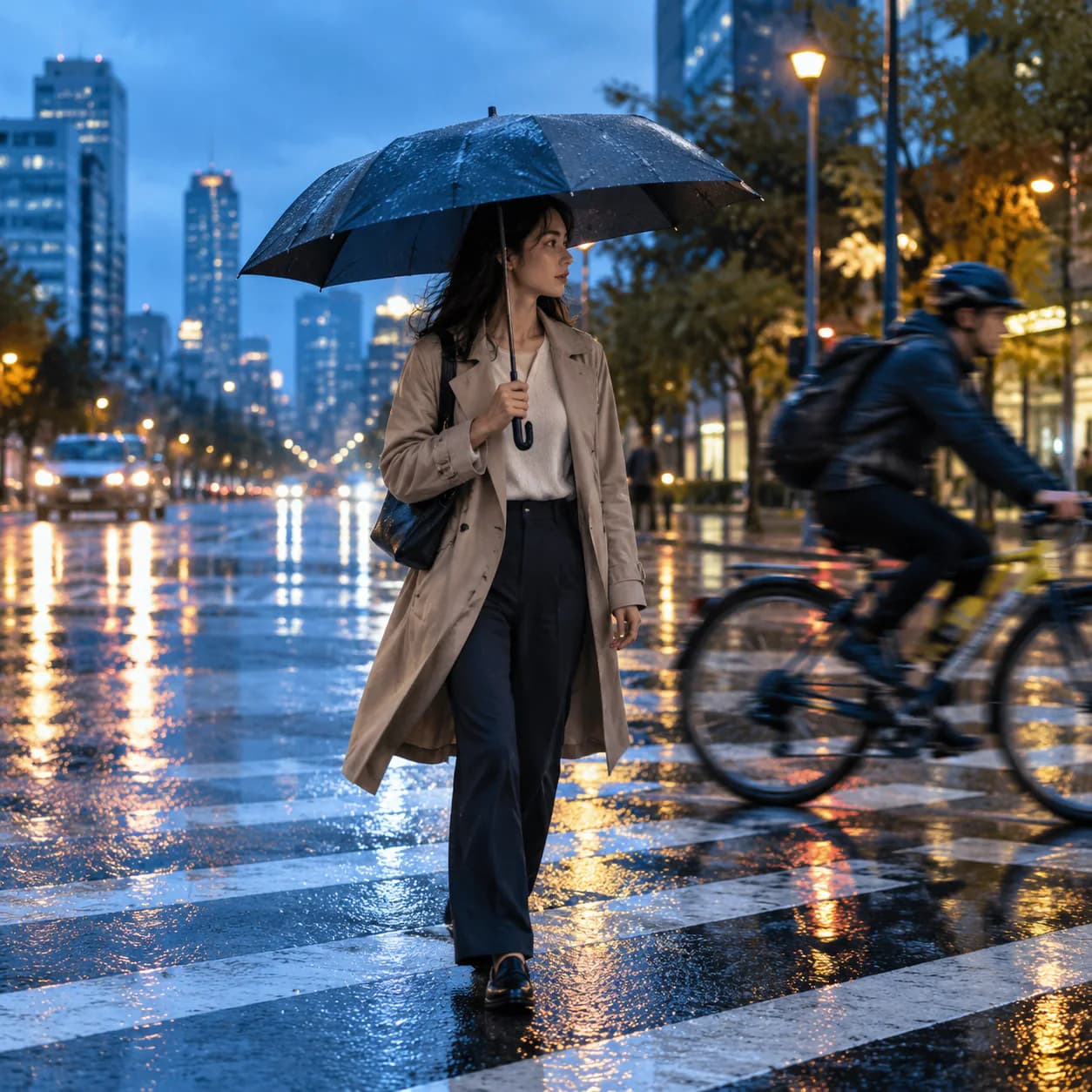
Photoreal cinematic video of an adult commuter crossing a rainy city street at blue hour, wet reflections, passing bicycle, believable motion blur and physics.
What makes an AI realistic video read as real
Viewers judge realism on continuity, not detail. A single frame can be photoreal while the clip fails because background objects drift, the subject’s proportions change between frames, or lighting direction shifts mid-shot. Tell the model what must stay fixed — the camera height, the light direction, what is in frame — and keep that language identical across every shot in a sequence. Detail helps, but it is consistency that convinces.
Writing a shot that survives motion
One sentence, one camera move, one subject action. “Slow dolly-in on a ceramic mug on a kitchen counter, steam rising, morning window light from the left, locked camera height” survives; a paragraph with five simultaneous actions does not. Specify the lens by behaviour rather than number when you can: “compressed telephoto look” or “wide with slight barrel distortion”. End the prompt with what must not change — no new objects, no camera flip, no morphing.
Using a still as the first frame
Start from an image whenever continuity matters, because the clip inherits the composition, wardrobe and lighting you already approved. Upload a generated or real still, then describe only what happens next and how the camera moves. This is the fastest route to a matching pair of shots: generate the hero still in Image Studio on nano-banana-pro or gpt-image-2, then animate that exact frame here. Characters, products and locations stay locked across shots this way.
Choosing an Ofrai model for the shot
Use veo-3 when physical realism, natural lighting and believable motion matter most — it is the safest pick for anything that will be watched full screen. Use sora-2 for cinematic camera language and longer continuous takes. Use seedance-2-5 for fast iteration and multi-shot sequences where you need several variations of the same brief quickly. Use gemini-omni when the clip is driven by reference images and complex instructions rather than by a text brief alone.
Artifacts that give a clip away
Watch for: textures that swim on skin or fabric, text on signs that mutates, hands that change shape mid-gesture, and shadows that detach from their object. Most are fixed by shortening the take, since error compounds with duration. If a face drifts, generate fewer seconds and cut rather than extending. If the background drifts, add a sentence naming the objects that must stay put, and regenerate rather than repairing. Review at full screen and at quarter speed, since most of these defects hide in the transition between poses.
Duration, aspect ratio and camera grammar
Plan clips at the shortest usable length, then edit them together — two clean three-second shots beat one unstable eight-second shot. Choose aspect ratio by destination and stay on it: 16:9 for web and YouTube, 9:16 for Shorts, Reels and TikTok, 1:1 for feed. Use camera vocabulary deliberately: static tripod, handheld with slight drift, slow dolly, orbit, crane rise. Mixing two moves in one clip is the most common cause of a nauseating result.
What an AI realistic video generator cannot rescue
Do not ask for legible on-screen text, exact brand logos, or precise counts of objects such as a specific number of items on a shelf — those are the classic failure cases and no prompt fixes them. Do not use it for anything that must depict a real identifiable person without their consent. For product claims that depend on real material behaviour, shoot video; for mood, atmosphere and B-roll, generation is faster and cheaper.
Worked prompts for three different realities
Street documentary: “Handheld 35mm, late afternoon, a woman in a green raincoat crosses a wet tram platform, slight vertical drift in the frame, overcast sky, muted colour, ambient reflections on the asphalt, natural sound only, no music.” Kitchen process: “Locked tripod, 50mm, hands folding dough on a floured oak counter, window light from camera left, shallow depth of field, flour dust suspended in the air, real-time continuous action, no time-lapse.”
Product in motion: “Slow push-in on a stainless kettle on a gas hob, steam rising, dark kitchen, one practical lamp at camera right, reflections travelling across the brushed steel, smooth continuous camera move, 6 seconds.” Each prompt names camera, movement, light and the physical material doing something. A prompt that only names a subject hands all four to the model, and invented physics is what breaks believability.
Duration, aspect ratio and source images
Duration is the setting most often set wrong. Five to eight seconds is the range where current engines hold physical consistency; past roughly ten seconds, hands, reflections and small objects begin to drift, and the correct fix is to shoot two clips and cut between them rather than to request one long take.
Aspect ratio should match the delivery surface — 9:16 for vertical feeds, 16:9 for web and YouTube, 1:1 for square placements — because cropping a moving clip in an editor gives a different result from generating at the target ratio. Upload a reference still as the first frame whenever the scene has a specific look worth preserving.
Audio changes the verdict faster than picture
Viewers judge realism within the first second largely on sound, and most teams generating realistic clips ignore audio until the edit. Three layers usually convert a synthetic clip into a believable one: room tone that matches the interior, a soft foley layer on whatever is being handled, and a low-frequency street or room bed under everything. The fastest giveaway is silence where a space should be busy — an empty market with no crowd, a cafe with no chatter — which reads as fake faster than any visible artifact.
If your workflow has no audio stage, generate with the assumption that ambience arrives later, and avoid prompts that depend on visible speech. Lip-sync attempts fail far more often than lip-sync omission, so keep speech off screen or frame a shot where the speaker is not visible.
What one believable clip costs in credits
Realistic clips cost more than stylized ones because you almost always need several candidates and a longer duration, and those two scale cost together. A practical budget for a ten-second usable shot is three to five generations: one or two on a cheaper engine to settle framing and camera movement, then two or three on seedance-2-5, sora-2 or veo-3 for the final, plus one spare in reserve for the take that fails on the last second.
Each generation shows its Ofrai credit cost before it runs, and previewing at lower resolution and shorter duration while framing is still undecided keeps exploration cheap. Do not render final quality until the camera move is right, because raising resolution reveals artifacts rather than repairing them.
When a real camera is the better call
Generated footage wins where the shot is dangerous, expensive, impractical to schedule, or where one idea needs twenty variations: hazardous work, extreme weather, deep space, historical settings, product concept previsualisation, and background plates that actors will be keyed into later. Book a real camera when credibility is the entire product — testimony, documentary work, anything a viewer could mistake for an actual event, and anything requiring a specific person to appear with a recognisable likeness and consistent performance across several shots.
It is also worth remembering that most material that fails to read as real is not the engine; it is a missing reference, a camera move nobody constrained, or audio that was never part of the plan.
How AI realistic video differs from stylized generation
Realistic clip generation optimises for physical plausibility, which means it works against stylisation: exaggerated colour, unnatural proportions, floating objects and impossible motion all get flattened toward documentary behaviour. If you want a painterly, anime, low-poly or heavily graded look, a stylisation-tuned engine will follow your brief more obediently than a realism-tuned one, and you will spend fewer passes getting there. The useful overlap is a sequence rather than a compromise: generate the base plate as believable footage, then restyle it.
That preserves camera behaviour that reads as real while leaving the final look open, and it is the standard approach for ads that need a sense of space before the grade goes on.
When you need an illustration to plan a fictional collision sequence, start with a storyboard frame for a fictional car crash.
Examples
FAQ
- What is the most realistic video model on Ofrai?
- veo-3 is the strongest default for photoreal footage because its lighting, motion and physical behaviour hold up over a few seconds. sora-2 is equally strong when your priority is cinematic camera language and longer continuous takes. Realism also depends on the brief: short, single-move shots look convincing on every listed model.
- How do I keep the same character across several clips?
- Generate an approved still of the character first, then upload that image to each clip and describe only the action and camera move. Image-to-video input inherits composition, wardrobe and lighting from the frame, which is far more reliable than re-describing the character in text for every shot.
- How long should each generated clip be?
- As short as the edit allows, typically three to five seconds. Quality degrades with duration because errors compound frame by frame. Plan several short shots and cut them together in an editor instead of requesting one long clip, and fix the first shot’s camera move before adding more movement.
- Can I animate a photo I already generated?
- Yes. Upload the image to Video Studio as the starting frame and write only what changes: subject action, camera movement, ambient motion such as steam or fabric. The clip inherits the image’s lighting and composition, which is why animating a carefully made still usually beats generating the clip in one pass.
- Why does text in my video distort or change?
- Rendered lettering is the most unreliable element in generated video. Letters often re-form between frames or resolve into illegible marks, and more prompt emphasis rarely fixes it. If text must be readable, generate the clip without it and composite the caption in an editor, or keep text out of frame entirely.
- Do Ofrai video generations use the same credits as images?
- Yes. Ofrai keeps one credit balance across text, image and video work, and Video Studio shows the credit cost of a job before you run it. Longer clips and higher resolutions cost more, so test composition at low settings and render finals once the shot is locked.
Related generators
- AI Animal Video Generator
- AI Anime Video Generator
- AI Furry Video Generator
- AI Short Video Generator
- Best AI Long Video Generator
- Wan 3.0 Video Guide for Motion and Camera Work
- AI Object Replacement Video
- AI Outfit Swap Video
- AI Photo Dance Video Generator
- AI Product Swap Video
- AI Virtual Try-On Video
- Photo to video