Features
AI Cover Up Tattoo Generator
Visualize a possible cover-up over a tattoo you own or have permission to photograph. Upload the image in Ofrai Image Studio, describe the replacement motif and generate a visual mockup. Only a tattoo artist can assess whether the old ink can actually be covered on skin.
New accounts include 1 free GPT Image 2.5 generation. Other models and video use credits.
Example prompts
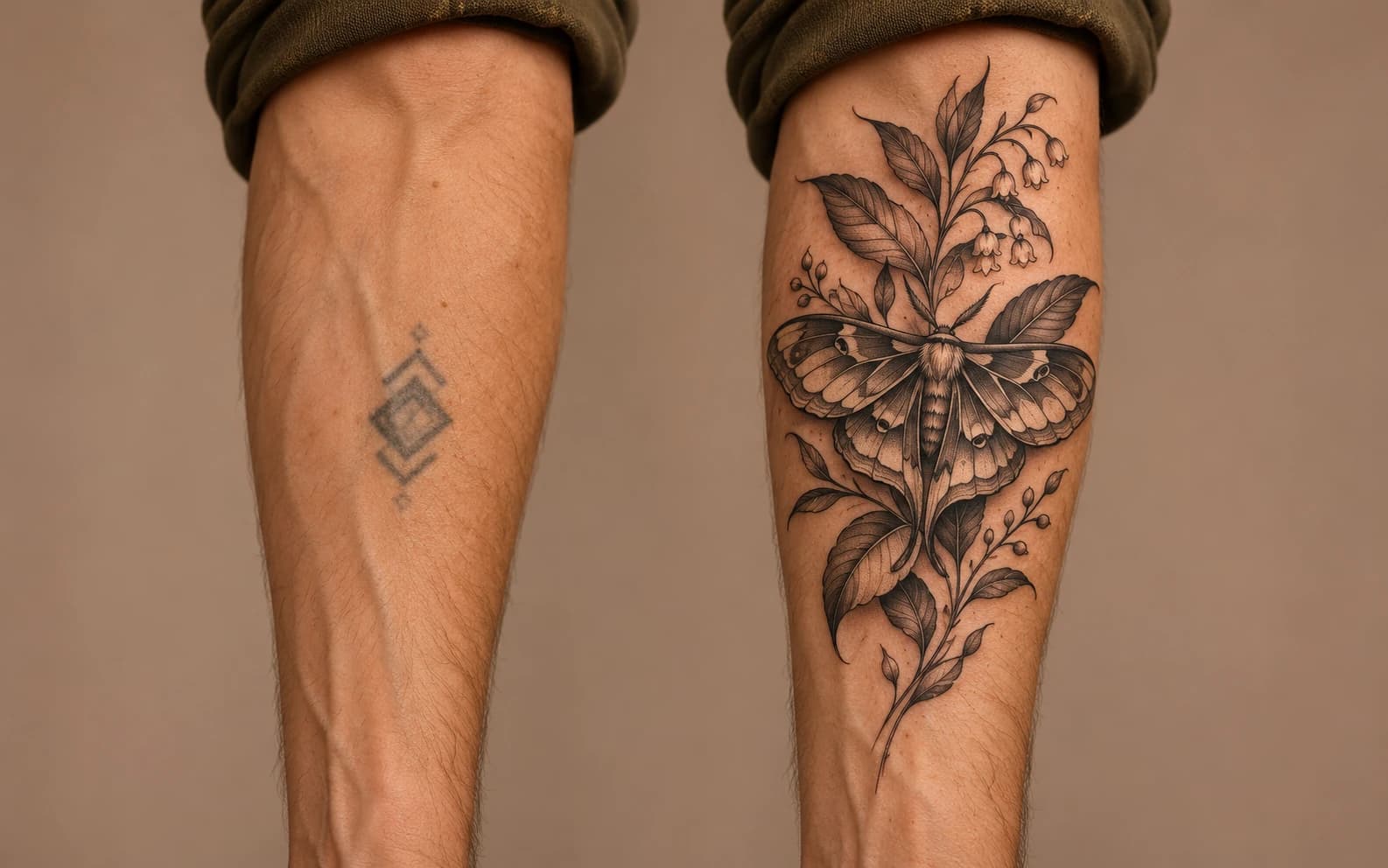
Tattoo cover-up concept on a fictional adult forearm: a dark botanical sleeve of layered leaves and a night moth placed over a small faded geometric mark, black-and-grey ink look, realistic skin, clear natural light, no text.
Start from the real placement
Photograph the tattoo in even light with enough surrounding skin visible to plan a larger composition. In the edit prompt, describe the old mark's location and the new motif, then say what skin and arm pose should remain. The model may redraw the arm or shift the old ink, so compare the result with the source photo after every run.
Think in coverage, not just decoration
A light flower over a dense dark tattoo may look convincing in an AI mockup but fail as a physical cover-up. Explore shape, contrast and extension into clean skin, then take the chosen image and the original photo to an experienced artist. They can evaluate pigment depth, scars, healing and workable colors.
Use the output as a conversation aid
Save a few variations that show different motifs rather than repeatedly changing tiny details. Point out which lines or colors you like and ask the artist to redraw them for your anatomy and existing ink. The generated image is neither a stencil nor a guarantee of final tattoo appearance.
Test contrast in several mockups
Try a dark botanical shape, geometric shading and a larger illustrative motif as separate concepts. Compare how each idea sits over the original mark and where it extends into clear skin. The model can hide old ink digitally in a way real pigment cannot, so treat apparent coverage as visual only.
Bring useful references to the artist
Save the original tattoo photo beside the preferred mockups and note which shapes and colors matter to you. Ask the artist to assess size, placement, pigment and healing before drawing a stencil. Do not copy the generated image directly onto skin without that professional redesign.
FAQ
- Will this prove that an old tattoo can be hidden?
- No. It is a visual mockup. An artist must examine the old ink, skin and placement before advising on a real cover-up.
- Can I upload a photo of my tattoo?
- Yes, use your own or an authorized photo as a reference and review the generated arm against the original because image edits can shift details.
- Does Ofrai produce a tattoo stencil?
- No. The output is an image mockup. A tattoo artist must draw and size a usable stencil for your skin and existing ink.