Blog
Compare AI Generators for Posters in 2026
By Ofrai Editorial (Editorial Team)
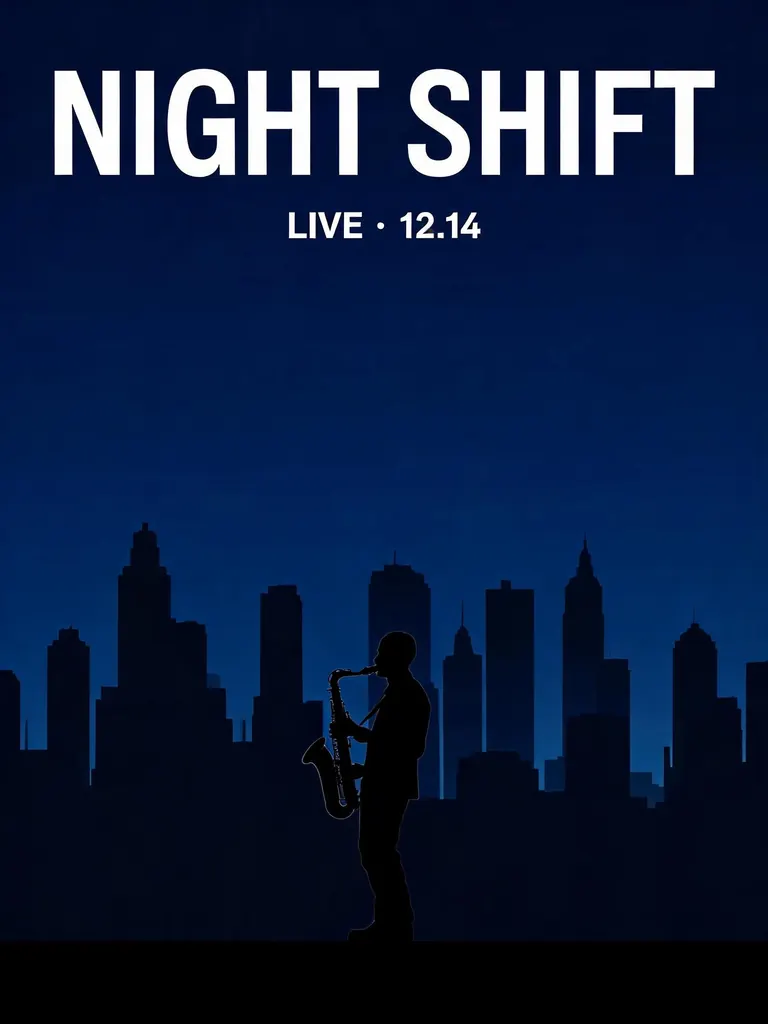
For a minimalist poster, start by comparing Seedream 5 and GPT Image 2.5. On our concert brief both rendered the headline and date correctly, and Seedream 5 stayed closer to the requested silhouette. Use the sample below to compare layout, then test the exact wording and crop you plan to publish.
Compare on the same brief
Give each candidate the same wording, reference image, aspect ratio, resolution and output count where supported. Check spelling, date, price, hierarchy and crop separately. Record the model and settings with each result. A single example is not proof that a model will win every task; use the published same-prompt comparisons as examples, then check your own brief.
Try the concert poster comparison
Open the same-prompt comparison linked below and find the 3:4 concert poster. Both models received the same brief: a saxophonist against a blue skyline, with “NIGHT SHIFT” as the headline and “LIVE · 12.14” underneath.
First read both lines at the size you would publish. Then check the space between the date and the silhouette. If the composition works but a letter or date is wrong, keep the artwork and set the exact wording in your design tool. Try the same checks on your own poster before choosing a model.
Choose for the deliverable
Try GPT Image 2 or GPT Image 2.5 for a layout containing short text; compare photographic backgrounds separately from typography. Inspect every character before publishing. For long copy, legal terms or exact brand typography, generate the artwork and set the approved text in a design tool.
Budget using current prices
Check Pricing and the Generate button for the selected model, resolution and output count. Prices change; a historical comparison is not a current quote. Budget for discarded drafts as well as final images. New accounts include one GPT Image 2.5 image voucher; other models use credits. Start with one image and review it before ordering a batch.
How to brief a poster so the words survive
Give the exact string in quotes, on its own line, and say where it sits and how large it is relative to the frame. Keep the wording separate from the description of the picture, because a model that is good at type and a model that is good at atmosphere fail in different ways when you mix the two instructions. Say what should not appear.
And read the result as a layout rather than as a picture: is the hierarchy right, does the copy read at the size it will actually be seen, and does the frame still work if the poster is cropped for a different placement. The last check is the one that saves work, because most posters are made once and then cut down for at least three placements.
Run a poster in Ofrai
Open Image Studio, select the model, paste the exact headline and describe its position and background. Set an available aspect ratio, resolution and output count, then check the displayed cost. Keep the brief and reference for comparison; review the available settings again after switching models. The welcome voucher applies to one GPT Image 2.5 image.
For more comparisons and buying guides from the same team, see model comparisons, generator roundups, and the Ofrai Editorial team.
Two outputs from the same concert poster brief
Ofrai test · 2026-10-25 · 1K · 3:4 · one image per model from the same text prompt.
Minimalist concert poster with the headline "NIGHT SHIFT" in large bold white sans-serif letters at the top and "LIVE · 12.14" below it, a lone saxophonist silhouetted against a deep blue city skyline.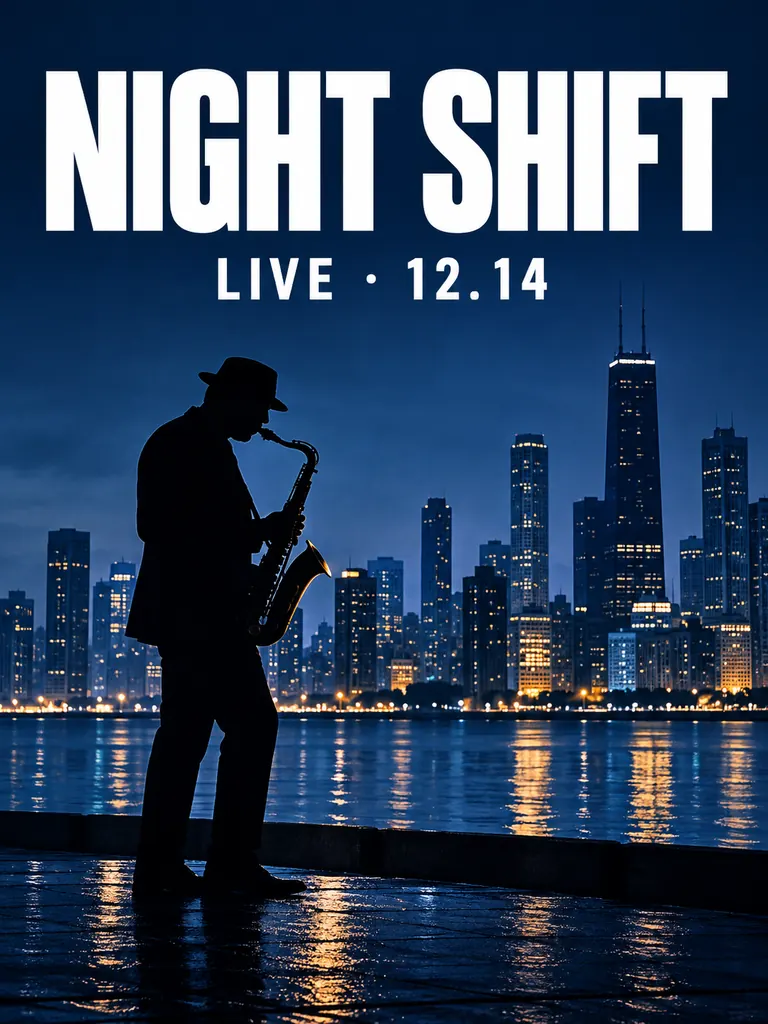
FAQ
- Which model should I choose for poster text?
- Compare GPT Image 2 and GPT Image 2.5 on your actual headline. Check every letter; use a design tool for long or exact copy.
- How do I reduce text mistakes?
- Put the exact wording in quotes, specify its position and leave enough clear space. Proofread the final output at its intended display size.
- Which model is cheapest?
- Compare the current prices for the same resolution and output count. Include rejected drafts when calculating the cost of a usable poster.
- Do I need 4K?
- Choose the output dimensions for the final placement and the resolutions the selected model offers. Check print requirements with your printer before generating.
- Should I add text afterwards?
- Use a design tool for exact fonts, prices, dates and legal copy so you can change them without regenerating the artwork.