
Good ecommerce images have a job: make the product easy to understand, credible, and attractive in the few seconds before a shopper scrolls past. The hard part is usually not generating one attractive image. It is creating a complete, consistent set of images for a product page, marketplace listing, and social campaign.
OFR AI is useful for this workflow because the product brief, image task, model choice, output settings, credit quote, and finished asset can stay in the same workspace. This guide shows a practical process you can repeat for each SKU.
One product, four useful ecommerce assets
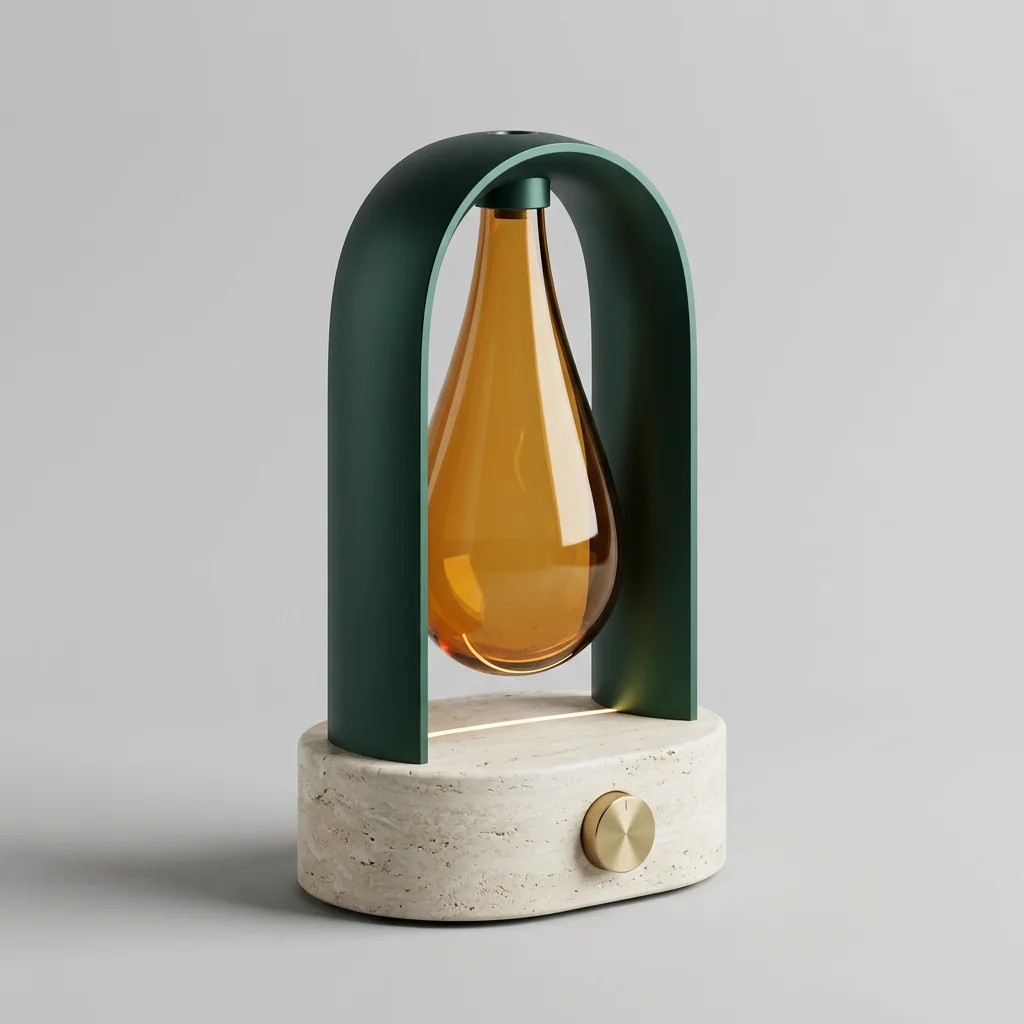
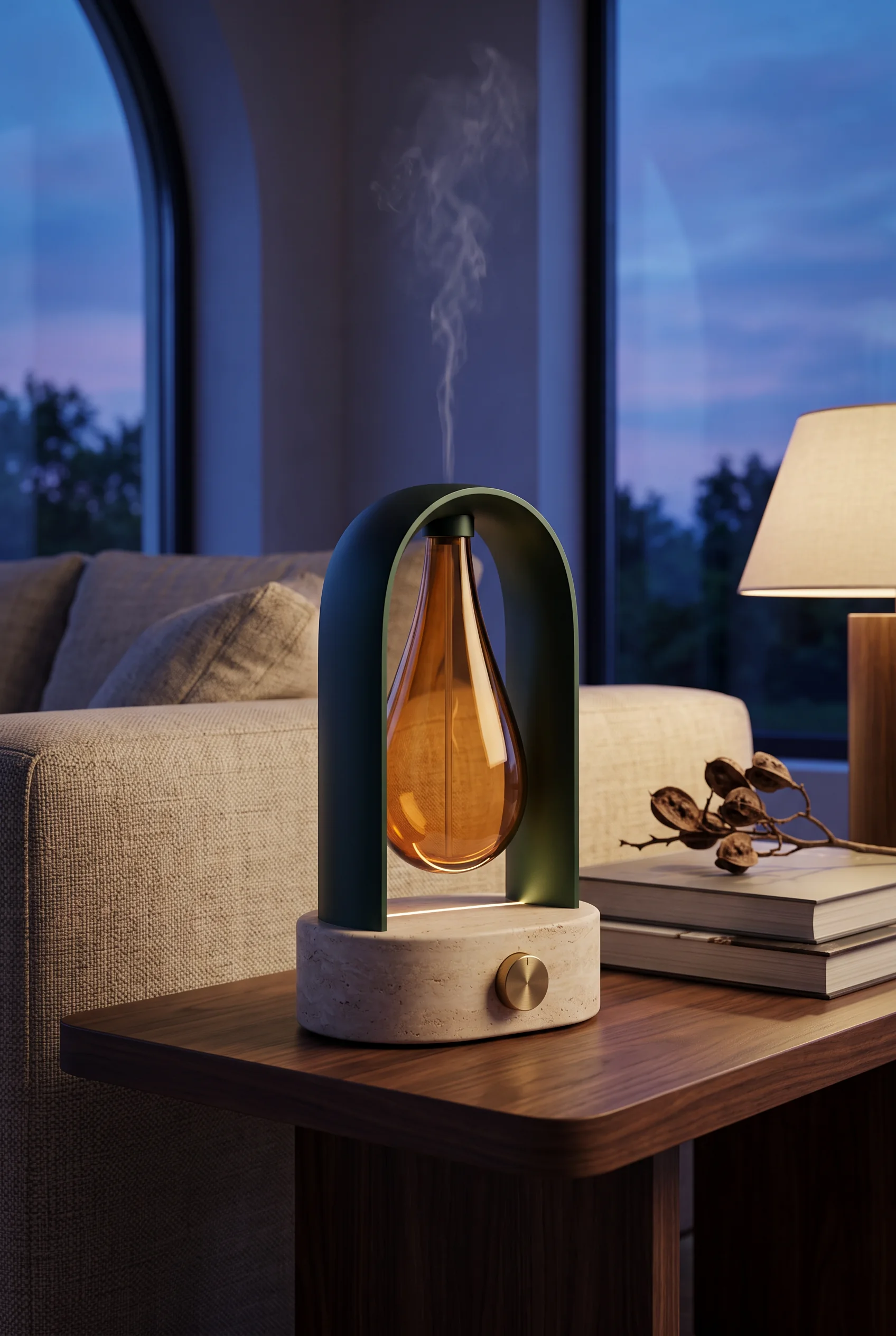
The example below was created with the live Nano Banana 2 image route used by OFR AI. It is an original, synthetic, unbranded smart aroma diffuser: an ivory travertine base, deep-jade aluminum arch, suspended amber-glass reservoir, and brushed-brass dial. We established those design anchors in a neutral reference, then carried the same object from an editorial product image into a real living room and finally into a more surreal campaign world.


What to create from one product reference
Start with a small asset set instead of asking for every possible variation at once:
- Hero image: a clean composition that makes the product and its main benefit immediately clear.
- Detail image: a closer view of texture, controls, materials, or an important feature.
- Lifestyle scene: the product in a believable environment that helps shoppers imagine using it.
- Campaign variation: a wider composition with intentional space for a headline, offer, or platform overlay.
Keep the product reference and the product facts fixed. Change the setting, composition, or lighting one at a time so you can tell which prompt produced a useful improvement.
Step 1: Prepare the product reference
Use the clearest image you have: the whole product should be visible, reasonably well lit, and not blocked by hands, stickers, or heavy reflections. If the package includes a logo or required text, treat the generated image as a creative draft and inspect every character before publishing.
Step 2: Write a useful product image prompt
A reliable prompt gives the model six types of information:
- What the product is and which details must remain unchanged.
- Where the image will be used: marketplace hero, product page, social ad, or campaign banner.
- The composition: centered, three-quarter angle, close-up, or room for copy.
- The environment and materials: studio background, kitchen counter, desk, bathroom, or outdoor scene.
- The lighting and camera feel: soft studio light, natural window light, crisp commercial photography, or editorial.
- The output shape and any elements to avoid.

Try this starting template in OFR AI:
Create a commercial ecommerce product image for [product]. Keep the exact product shape, color, material, controls, logo placement, and packaging details from the reference image. Show it in [scene] with [lighting]. Use a [composition] composition, [aspect ratio], realistic materials, clean edges, and natural shadows. Leave [amount] of negative space on [side] for copy. Do not add extra products, unreadable labels, warped text, or hands covering the product.
The template is intentionally specific about what should not change. “Make it look premium” is a useful direction, but it is not enough to control a product image on its own.
Clean marketplace hero
Use for a product page or marketplace listing.
Create a clean ecommerce hero image from the reference. Preserve the exact product shape, color, material, controls, logo placement, and packaging. Center the product on a neutral light background with soft studio lighting, crisp edges, and a natural contact shadow. 1:1 composition. No props, extra products, decorative text, or distorted labels.
Lifestyle scene
Use to show context without losing product accuracy.
Place the referenced product in a believable modern home environment where it would naturally be used. Preserve every product detail. Use soft window light, realistic scale, natural reflections, and a three-quarter camera angle. Keep the product as the clearest subject. 4:5 composition. No hands covering the product and no invented accessories.
Social ad variation
Use when the layout needs room for campaign copy.
Create a high-contrast social campaign image using the referenced product. Keep the product unchanged and place it on the right third of the frame with clean negative space on the left for a headline. Use polished commercial lighting and a restrained background related to the product category. 4:5 composition. Do not render any text or logo beyond the original product packaging.
Step 3: Generate the four core variations
| Asset | Prompt direction | Review before publishing |
|---|---|---|
| Hero | Clean background, product centered, soft shadow, minimal distractions. | Product silhouette, color, crop, and any packaging text. |
| Detail | Close composition, directional light, focus on the feature that proves the benefit. | Texture, ports, buttons, seams, and proportions. |
| Lifestyle | Believable setting, natural interaction with the environment, product remains the visual focus. | Scale, contact shadows, reflections, and scene realism. |
| Ad | Stronger composition, high contrast, intentional empty space for a headline or offer. | Readable layout, safe text area, and consistency with the hero image. |
In OFR AI, choose the image workspace, upload the reference, set the aspect ratio and resolution, then review the expected credit cost before you generate. For expensive or important assets, make a small test batch first and keep the strongest direction for the next variation.
How to keep product images consistent
Consistency comes from controlling the inputs, not from generating dozens of unrelated prompts. Use the same reference image, the same short product description, and the same color and material language across the set. Then change only one of the following:
- background or location;
- camera angle or crop;
- lighting direction;
- copy-safe negative space;
- platform aspect ratio.
Save the approved product description with the asset. A precise internal reference such as “ivory travertine oval base, deep-jade aluminum arch, suspended amber-glass reservoir, centered brushed-brass dial” is more useful than a vague description such as “modern premium diffuser.”
Quality control checklist
Before an image reaches a product page or ad account, check it at the size shoppers will see:
- Does the product match the real shape, color, material, and packaging?
- Are labels, numbers, ingredient lists, and logos accurate and readable?
- Are shadows, reflections, contact points, and scale physically believable?
- Is the product still the clearest subject at mobile width?
- Does the crop leave enough room for the platform UI or campaign copy?
- Does the image comply with the marketplace and ad policy for the channel?
When a result fails, do not rewrite the whole prompt immediately. State the exact failure: “the lid is too wide,” “the logo moved,” or “the product is too small in frame.” Then regenerate with that one correction.
From one image to a repeatable ecommerce workflow
The strongest process is brief-first: collect the product name, audience, core benefit, proof points, visual restrictions, target channel, and desired asset list. Use that same brief for image prompts, product-page copy, and short-form video storyboards. This reduces contradictory claims and gives every asset the same product story.
OFR AI keeps these tasks under one account so you can review the model, settings, and expected credits before starting, then find completed media in the private asset library. Failed or cancelled tasks release unused reserved credits according to the product billing rules.
Ready to test a real product?
Start with one reference image and create a hero, lifestyle, and ad variation in OFR AI.